
Overview
You will learn
- How to maintain ABAPDoc comments
- How to synchronize comments so they appear in the Outline View
- How to add an sorted list
- How to create a link to other development object documentation within ADT


Prerequisites
Prerequisites
- You have an entitlement to SAP BTP ABAP Environment. For more information, see Tutorial: Create Your First ABAP Console Application, steps 1-2
- You have installed ABAP Development Tools, latest version
Steps
Intro
ABAPDoc comments are used to document your code. This makes it more readable. If other developers use one of your development objects, they can find out more about it by selecting the object name in the code and choosing Element Info ( F2 ).
All ABAPDoc comments begin with "!.
Always replace XXX with your initials or group number.
First, open the ABAP class ZCL_AMDP_DEMO_XXX from the tutorial Create an AMDP and Analyze Its Performance

Immediately before the class definition, add an ABAPDoc comment to the class by entering
"!and choosing Auto-complete (Ctrl+Space).From the dropdown list, choose Paragraph, then add the following comment:
"!<p>Class tests AMDP</p>
step2a-choose-paragraph You must insert the ABAPDoc comment immediately before the declaration; otherwise you will get a warning from ADT.
Add the following to the paragraph (
<p>) tag:class="shorttext synchronized", so your code looks like this:Code"!<p class="shorttext synchronized">Class tests AMDP: </p>Add the following comments to the table type
ty_result_lineand to the methodGET_FLIGHTSrespectively:Code"!<p class="shorttext synchronized">Table type of Flights from HANA DB</p> "! <p class="shorttext synchronized"> Method reads flights from HANA DB using AMDP</p>Save and activate your class.
The comments should now appear in the Outline View:

Choose Enter. The system automatically inserts the ABAPDoc comments annotation
"!"for you.Again, choose Auto-complete (
Ctrl+Space). Then choose Sorted list.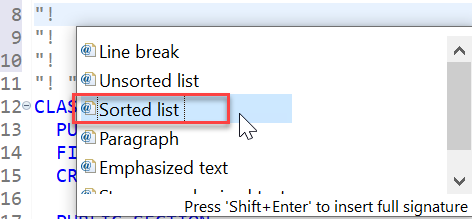
step3a-add-sorted-list Add the following two statements, so that your code looks like this:
Code"! <ol> "! <li>Reads flights from HANA DB</li> "! <li>Converts currency to EUR</li> "! </ol>
Immediately after the sorted list, choose Enter.
Now enter the following comment:
"! <p>Implements the interface { @link INTF: if_oo_adt_classrun } </p>
This creates a link to the Element information for that interface.
Save and activate your class (
Ctrl+S, Ctrl+F3).Select your class and choose Show code element information (
F2).Your comments should appear look like this:

step4a-element-info If you choose the link to the interface, its documentation appears:

step6b-interface-abapdoc
- SAP Help Portal: Editing ABAP Doc Comments
- SAP Keyword Documentation: ABAPDoc
Resources
Discussion
Share feedback on this tutorial or join the conversation in SAP Community.