
Overview
You will learn
- How to import and use charts with UI5 Web Components for React
- How to add dynamic rendering


Prerequisites
- Complete the tutorial Create a Card Component.
Steps
Intro
UI5 Web Components for React also comes with a chart library. In this tutorial, you will integrate two chart types and add data to them. Also, you will learn how to conditionally render components, and how React handles updates to the DOM and single components.
Install the chart library of UI5 Web Components for React.
Shellnpm install @ui5/webcomponents-react-chartsNote: When facing issues with installing, please ensure you’re using the same minor version as the other
@ui5/webcomponents*packages. You might have to also manually pin@ui5/webcomponents-react-baseto that minor version. In that case, the install command would benpm install @ui5/webcomponents-react-charts@<version> @ui5/webcomponents-react-base@<version>.For example:
Shellnpm install @ui5/webcomponents-react-charts@2.27 @ui5/webcomponents-react-base@2.27Then, import
LineChartandBarChartintoMyApp.tsx.TypeScriptimport { BarChart, LineChart } from "@ui5/webcomponents-react-charts";
Charts only offer limited accessibility support with only basic built-in features, so it’s essential to ensure your implementation meets the accessibility standards of your application!
Start with the
LineChart. You can add it underneath theTextcomponent. Then pass thedimensionsandmeasuresprops with empty arrays as values.TypeScript<Text style={{ padding: "var(--sapContent_Space_S)" }}> This is the content area of the Card </Text> <LineChart measures={[]} dimensions={[]} />In the application you should now see a placeholder for the
LineChartwithin theCardcontent. The reason for this is that the chart has not received any data and therefore the placeholder is displayed.Add data to your component. For this sample
datasetis static, and you can define it outside the component, right above yourMyAppcomponent.TypeScriptconst dataset = [ { month: "January", data: 65 }, { month: "February", data: 59 }, { month: "March", data: 80 }, { month: "April", data: 81 }, { month: "May", data: 56 }, { month: "June", data: 55 }, { month: "July", data: 40 } ];Now add the
datasetto yourLineChartand configure thedimensionsandmeasuresprops.TypeScript<LineChart dimensions={[{ accessor: "month" }]} measures={[{ accessor: "data", label: "Price" }]} dataset={dataset} />Congratulations, you implemented your first Chart component.
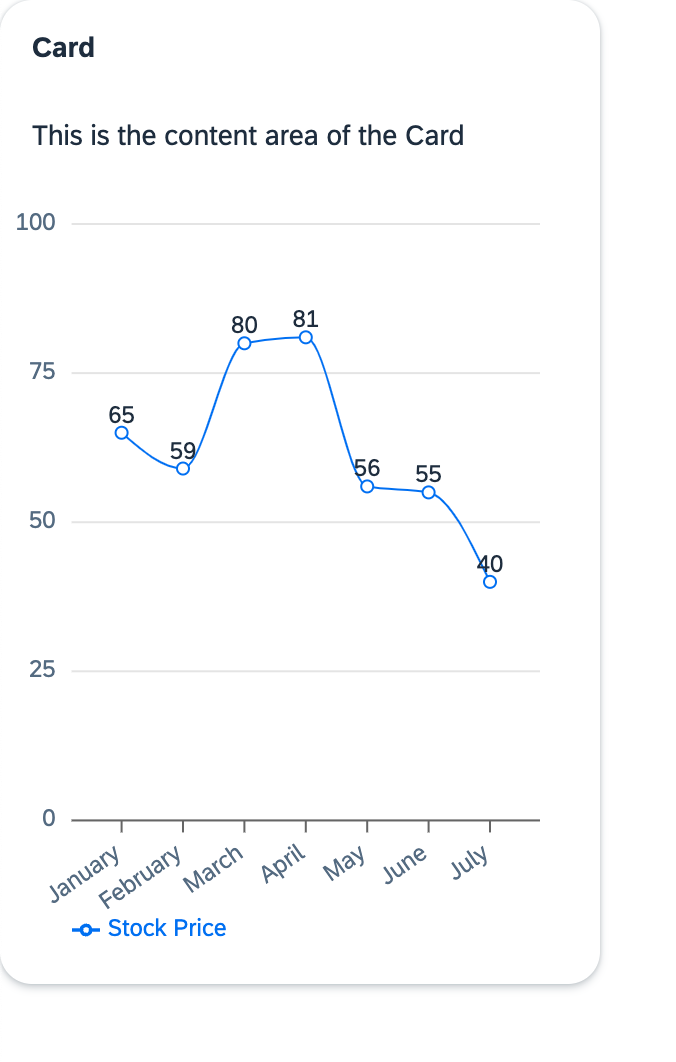
LineChart We now want to show the same data, just with a different representation. For that, you can use the same props as you did with the
LineChartfor aBarChartand add it to theCard.TypeScript<BarChart dimensions={[{ accessor: "month" }]} measures={[{ accessor: "data", label: "Price" }]} dataset={dataset} />Two charts are rendered now with equal datasets but different representations.
Your MyApp.tsx component should look like this:
import { Card, CardHeader, Text } from "@ui5/webcomponents-react";
import { BarChart, LineChart } from "@ui5/webcomponents-react-charts";
const dataset = [
{
month: "January",
data: 65,
},
{
month: "February",
data: 59,
},
{
month: "March",
data: 80,
},
{
month: "April",
data: 81,
},
{
month: "May",
data: 56,
},
{
month: "June",
data: 55,
},
{
month: "July",
data: 40,
},
];
export function MyApp() {
const handleHeaderClick = () => {
alert("Header clicked");
};
return (
<div>
<Card
header={
<CardHeader
titleText="Card"
interactive
onClick={handleHeaderClick}
/>
}
style={{ width: "300px" }}
>
<Text style={{ padding: "var(--sapContent_Space_S)" }}>
This is the content area of the Card
</Text>
 <LineChart
   dimensions={[{ accessor: "month" }]}
   measures={[{ accessor: "data", label: "Price" }]}
   dataset={dataset}
 />
<BarChart
   dimensions={[{ accessor: "month" }]}
   measures={[{ accessor: "data", label: "Price" }]}
   dataset={dataset}
/>
</Card>
</div>
);
}Two charts in one Card is a bit too much, don’t you think? It would be nicer if the charts could be toggled by clicking on the header. Let’s implement that!
First add a state. It should control which chart is going to be rendered. Use the State Hook logic to implement the state and set
"lineChart"as default value. Don’t forget to importuseStatefrom React, otherwise you will get an error.- Import the
useStatefunction in the header of theMyApp.tsxfile.
TypeScriptimport { useState } from "react";- Use the
useStatefunction right after you start to define theMyAppfunction (before the click handler).
TypeScriptconst [toggleCharts, setToggleCharts] = useState("lineChart");- Import the
By clicking on the
CardHeaderthe state should be set corresponding to the chart which should be displayed.Rewrite your
onClickfunction so it will handle this logic.TypeScriptconst handleHeaderClick = () => { if (toggleCharts === "lineChart") { setToggleCharts("barChart"); } else { setToggleCharts("lineChart"); } };To only render the current chart, replace the
Cardwith the following code:TypeScript<Card header={ <CardHeader titleText="Card" interactive onClick={handleHeaderClick} /> } style={{ width: "300px" }} > <Text style={{ padding: "var(--sapContent_Space_S)" }}> This is the content area of the Card </Text> {toggleCharts === "lineChart" ? ( <LineChart dimensions={[{ accessor: "month" }]} measures={[{ accessor: "data", label: "Price" }]} dataset={dataset} /> ) : ( <BarChart dimensions={[{ accessor: "month" }]} measures={[{ accessor: "data", label: "Price" }]} dataset={dataset} /> )} </Card>Done! Now you can toggle between charts by clicking on the header of the
Card.You can further improve your
CardHeadercomponent by using theavatarprop and adding anIconto it.Add the following
Iconimport to your component:TypeScriptimport { Card, CardHeader, Text, Icon } from "@ui5/webcomponents-react";The icons themselves can be imported altogether (
import '@ui5/webcomponents-icons/dist/AllIcons.js';), but to reduce bundle size and for better maintainability, it’s recommended importing each icon on its own:TypeScriptimport lineChartIcon from '@ui5/webcomponents-icons/dist/line-chart.js'; import barChartIcon from '@ui5/webcomponents-icons/dist/horizontal-bar-chart.js';Add the
avatarprop to theCardHeader, which receives anIconas value:TypeScript<CardHeader ... avatar={<Icon name={lineChartIcon} />} />The
Iconsshould also be conditionally rendered. Luckily, this is easy. Change thenameprop of theIconto the following:TypeScript<CardHeader avatar={ <Icon name={ toggleCharts === "lineChart" ? lineChartIcon : barChartIcon } /> } ... />Here we go! Now the
Cardalso changes theIconby clicking on the header.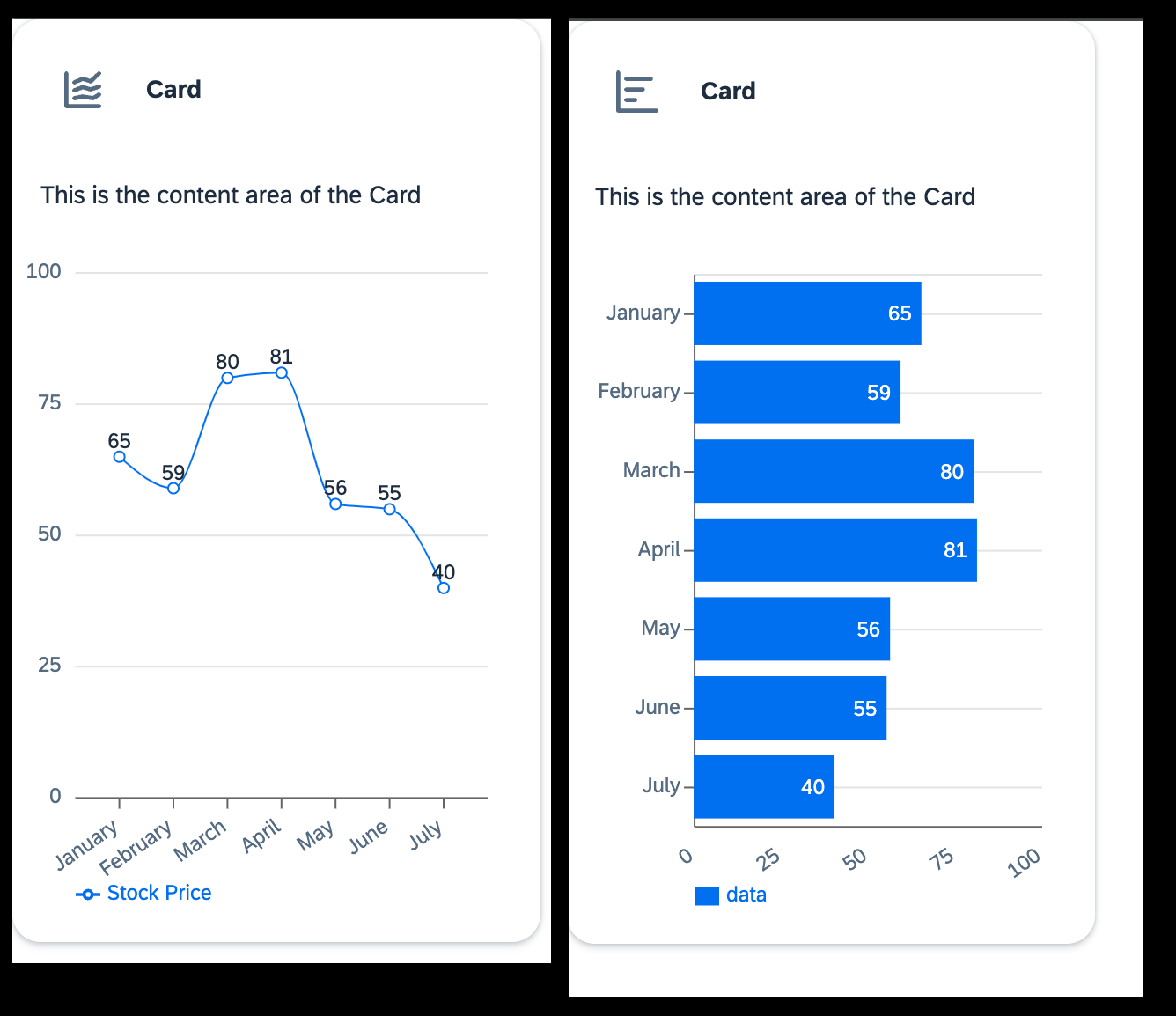
LineChart
If something went wrong you can compare your component to this code snippet:
import lineChartIcon from "@ui5/webcomponents-icons/dist/line-chart.js";
import barChartIcon from "@ui5/webcomponents-icons/dist/horizontal-bar-chart.js";
import { useState } from "react";
import { Card, CardHeader, Text, Icon } from "@ui5/webcomponents-react";
import { BarChart, LineChart } from "@ui5/webcomponents-react-charts";

const dataset = [
  {
    month: "January",
    data: 65,
  },
  {
    month: "February",
    data: 59,
  },
  {
    month: "March",
    data: 80,
  },
  {
    month: "April",
    data: 81,
  },
  {
    month: "May",
    data: 56,
  },
  {
    month: "June",
    data: 55,
  },
  {
    month: "July",
    data: 40,
  },
];

export function MyApp() {
  const [toggleCharts, setToggleCharts] = useState("lineChart");
  const [loading, setLoading] = useState(false);

  const handleHeaderClick = () => {
    if (toggleCharts === "lineChart") {
      setLoading(true);
      setTimeout(() => {
        setLoading(false);
        setToggleCharts("barChart");
      }, 2000);
    } else {
      setLoading(true);
      setTimeout(() => {
        setLoading(false);
        setToggleCharts("lineChart");
      }, 2000);
    }
  };

  return (
    <div>
      <Card
        header={
          <CardHeader
            titleText="Card"
            interactive
            avatar={
              <Icon
                name={
                  toggleCharts === "lineChart" ? lineChartIcon : barChartIcon
                }
              />
            }
            onClick={handleHeaderClick}
          />
        }
        style={{ width: "300px" }}
      >
        <Text style={{ padding: "var(--sapContent_Space_S)" }}>
          This is the content area of the Card
        </Text>
        {toggleCharts === "lineChart" ? (
          <LineChart
            dimensions={[{ accessor: "month" }]}
            measures={[{ accessor: "data", label: "Price" }]}
            dataset={dataset}
          />
        ) : (
          <BarChart
            dimensions={[{ accessor: "month" }]}
            measures={[{ accessor: "data", label: "Price" }]}
            dataset={dataset}
          />
        )}
      </Card>
    </div>
  );
}One of React’s main advantages is its efficient rendering mechanism: a component re-renders only when its state changes or when it receives new props from its parent. So it will not update the whole UI, but only components affected by changes.
In order to demonstrate this behavior, add a new
state(right after the definition of the chart state from the previous step).TypeScriptconst [loading, setLoading] = useState(false);Then edit your
handleHeaderClickfunction like this:TypeScriptconst handleHeaderClick = () => { if (toggleCharts === "lineChart") { setLoading(true); setTimeout(() => { setLoading(false); setToggleCharts("barChart"); }, 2000); } else { setLoading(true); setTimeout(() => { setLoading(false); setToggleCharts("lineChart"); }, 2000); } };Add
loadingto both of your charts.TypeScript<LineChart dimensions={[{ accessor: "month" }]} measures={[{ accessor: "data", label: "Price" }]} dataset={dataset} loading={loading} />TypeScript<BarChart dimensions={[{ accessor: "month" }]} measures={[{ accessor: "data", label: "Price" }]} dataset={dataset} loading={loading} />
This updates the component every time you switch between charts and simulates a data call with the 2000ms timeouts.
As you can see, only the component affected by the state is updated, and the rest stays the same: The CardHeader remains unchanged until the timeout is over (and setToggleCharts is called), whereas the charts loading prop changes immediately (as setLoading is called immediately). If you’re working with data, you most probably will need a loading indicator. All UI5 Web Components that are able to display data have a loading prop and therefore also a loading indicator.
To make your Card look cleaner and to give the user the information that the header is clickable, you can add some more logic to your component.
Add a dynamic content
TextAs of now the content text is not really informative. Let’s change that and include the chart type. Add the following constants to your component (e.g. after the state definitions):
TypeScriptconst contentTitle = toggleCharts === 'lineChart' ? 'Line Chart' : 'Bar Chart'; const switchToChart = toggleCharts === 'lineChart' ? 'Bar Chart' : 'Line Chart';Change the title and add a subtitle to your
CardFirst change the value of
titleTextto something that explains the content of theCard(e.g.,"Prices"). Then add asubtitleTextprop. Here you can give the users the information that they can switch between charts by clicking the header.TypeScript<Card header={ <CardHeader titleText="Prices" subtitleText={`Click here to switch to ${switchToChart}`} interactive avatar={ <Icon name={ toggleCharts === "lineChart" ? lineChartIcon : barChartIcon } /> } onClick={handleHeaderClick} /> } style={{ width: "300px" }} > <Text style={{ padding: "var(--sapContent_Space_S)" }}> {contentTitle} </Text> {toggleCharts === "lineChart" ? ( <LineChart dimensions={[{ accessor: "month" }]} measures={[{ accessor: "data", label: "Price" }]} dataset={dataset} loading={loading} /> ) : ( <BarChart dimensions={[{ accessor: "month" }]} measures={[{ accessor: "data", label: "Price" }]} dataset={dataset} loading={loading} /> )} </Card>Add accessibility attributes to the
IconIf the
headeralone does not sufficiently describe the currently visibleIcon, you can define anaccessibleName. Its value will be applied as thearia-labelof the internal element, which screen readers will pick up.In case the
headeralready explains the content and the icon is purely decorative, you can set itsmodeto"Decorative", so it will be ignored by screen readers.TypeScript<Icon name={ toggleCharts === "lineChart" ? lineChartIcon : barChartIcon } accessibleName={contentTitle} />
Resources
Discussion
Share feedback on this tutorial or join the conversation in SAP Community.