
Overview
You will learn
- to discover APIs in SAP Business Accelerator Hub
- to download Open API specification
- to create action project based on the API specification
- to configure API methods to update input and output fields
- to test API using destination option
- to release and publish action project to be consumed in the business process modelling


Prerequisites
- Access to a SAP BTP tenant with SAP Build Process Automation
- Complete the tutorial Setup Environment for S/4HANA Business Partner API
- S/4HANA Cloud system where Business Partner module is available
- A communication user to access S/4HANA Business Partner inbound services based on
SAP_COM_0008communication scenario ID
Steps
Intro
Action is a feature in SAP Build Process Automation to connect processes with external systems, be it SAP or non-SAP systems. This is an important piece of the puzzle especially if you want to automate or extend your business processes for any available LoB processes like S/4HANA, Ariba, SuccessFactors etc. These extensions can be easily build using SAP Build Process Automation, and using actions you can connect to your given S/4HANA, Ariba or other SAP LoB systems for any kind of GET, POST, PATCH and other calls.
In this tutorial, you will create an action project based on Business Partner API. The Business Partner (A2X) API is already available in Business Accelerator Hub. For this workshop you will leverage Customer - GET API which will be used to fetch the customer details from S/4HANA Cloud System.
- Download and extract Open API Specification zip file for Business Partner (A2X) API in your local file system.
Open API specification of 2.x or 3.x or higher is needed for creating action project. For APIs that are available in SAP Business Accelerator Hub, you can directly download the specification from the API overview section. For example: The API specification that will be used for fetching customer details in this exercise is downloaded from here.
Open SAP Build lobby with your username and password, then do the following
- Under Connectors, select Actions.

Action Project Choose Create.

Action Project In the Choose an API Source popup, under API Specification, select Upload API Specification.

Action Project Drag and drop or click Browse Files to upload open specification file downloaded in step above.
Choose Next.
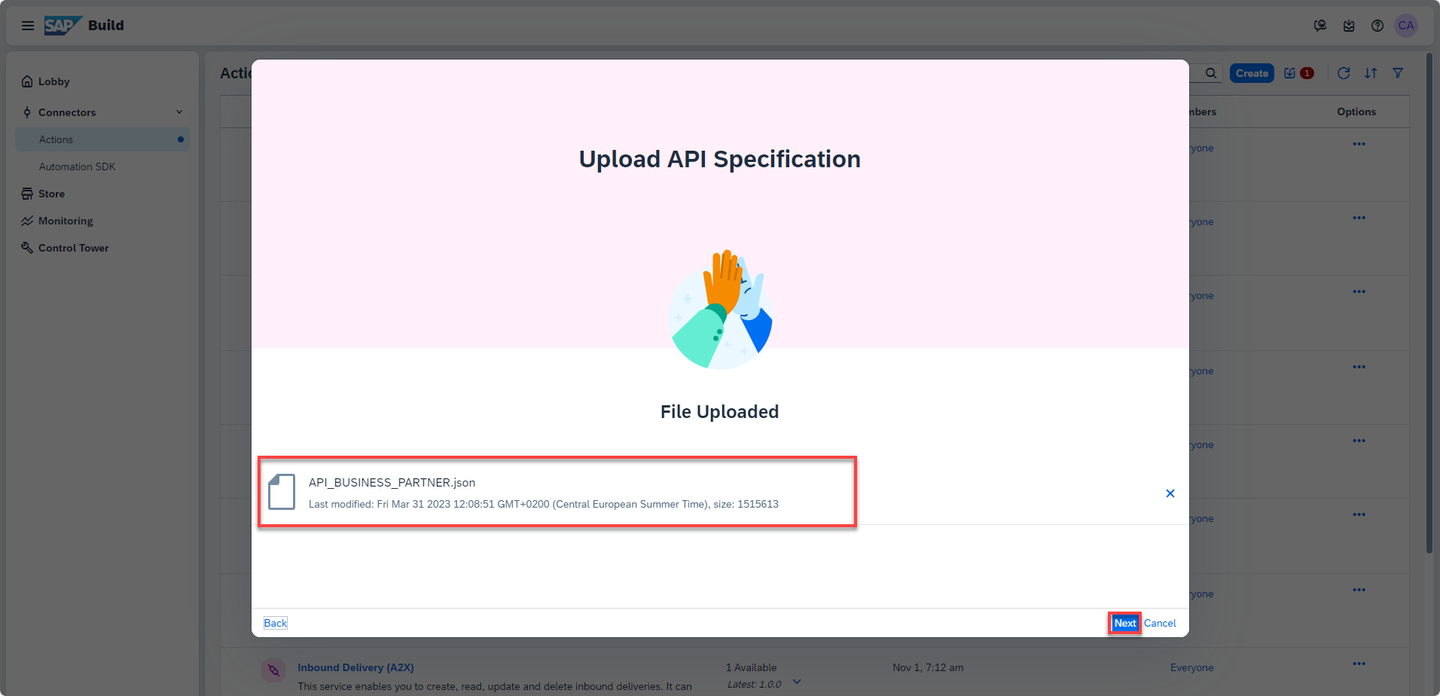
Action Project In the Create an Action project popup, do the following:
- Enter the Project Name as Business Partner.
- Enter the Description as Fetch customer details from the Business Partner API.
- Click Create.

Action Project Wait until the action project gets created.

Action Project As soon as the Business Partner Action gets created, SAP Build Actions will automatically open and the Add Actions From Business Partner pop up will appear.

Action Project
In the popup, you have to select GET method of
/A_CustomerAPI. You can either directly search from the given list of APIs or follow the steps below:- Select filter option.

Action Project - Select GET.

Action Project From the filtered list of APIs, choose Customer and select GET option for
/A_CustomerAPI.Click Add.

Action Project SAP Build Actions will open with the selected APIs which can be further configured based on the requirements.
The Action supports JSON files and the file size is limited to 5 MB, you need to fetch a specific number of records from your data source. This can be done using the
$topinput parameter. For this use case, you will be setting the parameter to 150. This will enable us to fetch the first 150 records and display their details.- Select the $top parameter.
- In the side panel, toggle the Static option to YES.
- Enter 150 in the Value field.
- Select Save.

Action Project With this you have configured the action project name and API input fields.
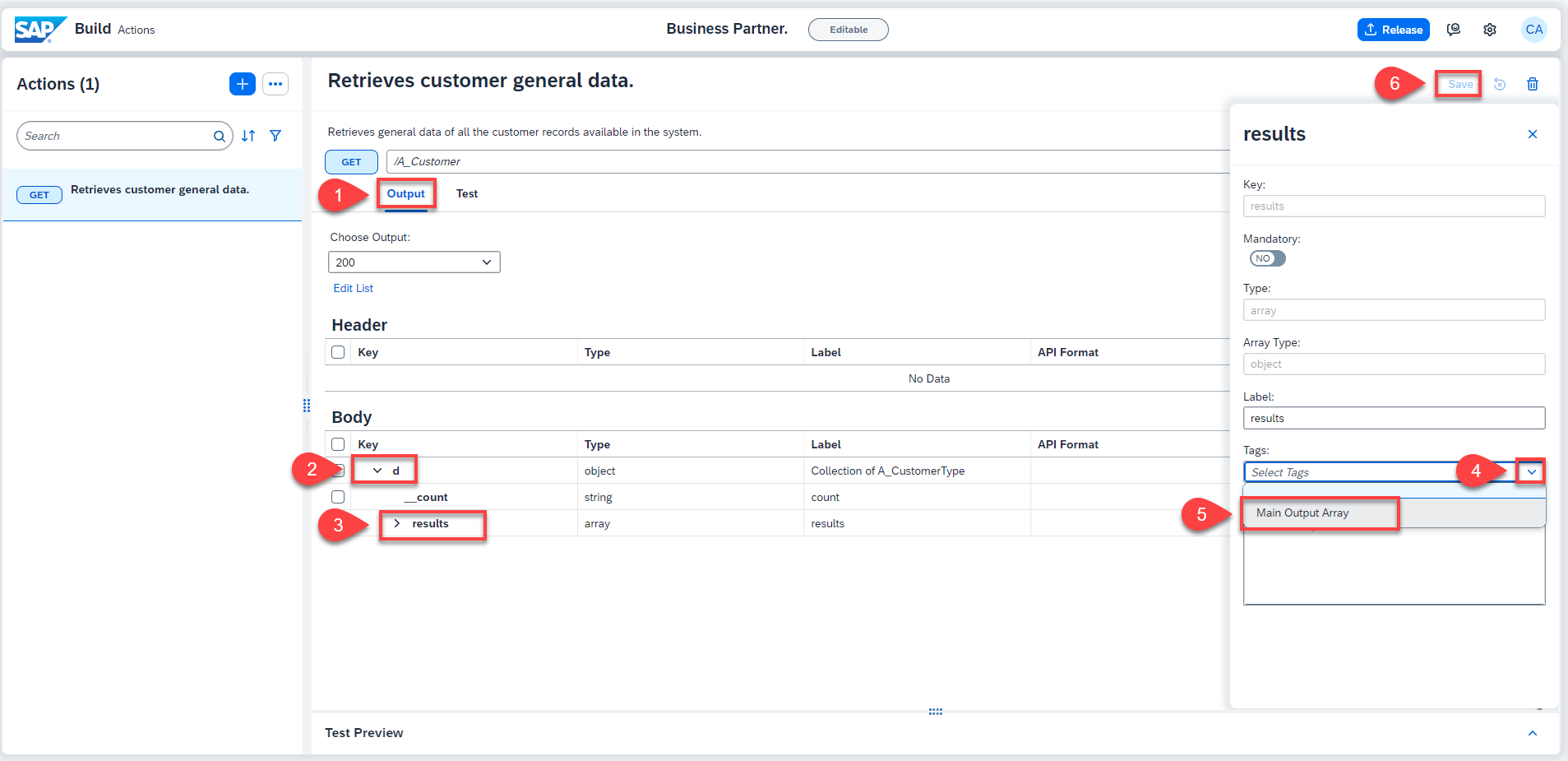
Similarly, configure the output fields. Do the following:
- Click Output tab.
- Expand the output key d.
- Select the results key.
- In the side menu, select the Tags dropdown and choose Main Output Array.
- Choose Save.
If this array is not marked as Main Output Array, the Actions Project will not be visible in the Form Editor as a data source.
Once the action project is configured and saved, it is time to test the changes and output. To test the API, do the following:
- Click Test tab.
- Select Destination option under Connectivity.
- Select
S4_Business_Partnerfrom the dropdown options.
The destinations are fetched from the SAP Business Technology Platform. The selected destination is already created in the account configured for this tutorial.
Notice that the input value is already picked from the default value entered while configuring the action project.
- Click Test.

Action Project - Once the execution is successful, you see 200 OK response with the details of the customers in the backend S/4HANA Cloud system.

Action Project The action gives a response which, in this use case, returns the customer details and related details. You need to display the customer names which are in an array of objects.
You will now release the action project to create version(s) and then publish a selected version in the action repository. It is then these published actions that can be used in different processes and applications to connect to external systems.
- To release a version of the action project, click Release from top-right corner.

- In the release popup, enter the Release Notes of your choice and click Release.
Notice the version of the project. It is in
majorVersionNumber.minorVersionNumber.patchNumberformat.

Once the action project is released, you can then publish any released version of the action by clicking Publish to Library from top-right corner.

With this you have successfully completed creating, configuring, releasing and publishing of action project. Now you will use this published action to get data for the dropdown in Form.
Resources
Discussion
Share feedback on this tutorial or join the conversation in SAP Community.