
Overview
You will learn
- How to create a custom LLM-as-a-judge evaluation metric (
tool-call-accuracy) directly through the AI Core API, including its rating rubric, evaluation steps, and few-shot example. - How to configure a prompt-optimization run that uses a custom metric instead of a built-in one.
- How to normalize a raw BFCL v3 dataset into the optimizer’s “golden record” format and upload it as a dataset artifact.
- How to register a base prompt, trigger and monitor an optimization execution, and retrieve the optimized prompt.
- How to compare base vs optimized prompts through live inference, and how the choice of metric (custom vs
JSON_Match) shapes the optimizer’s output.


Prerequisites
- You have an SAP AI Core service instance and a service key (with
clientid,clientsecret,url, andserviceurls.AI_API_URL). - You have the
generative-ai-hub-sdk(gen_ai_hub) andai-api-client-sdkinstalled, plusrequests,python-dotenv, andpydantic. - The models
gpt-4o:2024-08-06andgemini-2.5-pro:001are available in your AI Core tenant (check Generative AI Hub → Models). - You have a running orchestration deployment in your tenant (required only for the live comparison in Step 9).
- You have the BFCL v3 dataset file
BFCL_v3_parallel_multiple_10tools.jsonin your working directory. This is a subset of the Berkeley Function-Calling Leaderboard v3 benchmark. - (Optional) You have Bruno installed if you want to follow the REST API option blocks instead of the Python SDK.
Steps
Intro
Large language models are often asked to read a user’s question and decide which tools to call and with what arguments (“tool calling”). A vague system prompt like "You are a helpful assistant." usually makes the model reply in prose instead of structured JSON, which breaks any downstream code expecting machine-readable tool calls.
Prompt Optimization in SAP AI Core automates the trial-and-error of prompt engineering. You give it a starting prompt, a dataset of questions paired with correct tool calls (“golden answers”), and a metric that scores how good a candidate prompt’s output is. The optimizer then iteratively rewrites the prompt, tests it, and keeps the best-scoring version.
This tutorial goes one step further than simply using a pre-existing metric: you will create the custom evaluation metric itself from code, run the full pipeline, and finish by comparing a custom-metric-optimized prompt against a JSON_Match-optimized one to see how the metric choice affects the result.
Before writing any code, it helps to hold the whole flow in your head. Every step below re-uses a single authenticated client object and builds on variables created earlier, so the notebook cells (and the steps here) are meant to run in order, top to bottom.
The end-to-end pipeline is:
 ┌─────────────────┐     ┌──────────────────┐     ┌────────────────────┐
 │ 1. Connect to    │ --> │ 2. Verify/create  │ --> │ 3. Configure         │
 │    AI Core       │     │  the custom metric │     │  optimization params │
 └─────────────────┘     └──────────────────┘     └────────────────────┘
                                                              │
                                                              v
 ┌─────────────────┐     ┌──────────────────┐     ┌────────────────────┐
 │ 6. Register       │ <-- │ 5. Register base  │ <-- │ 4. Load/normalize +  │
 │  base prompt      │     │  dataset artifact  │     │  upload BFCL data     │
 └─────────────────┘     └──────────────────┘     └────────────────────┘
         │
         v
 ┌─────────────────┐     ┌──────────────────┐     ┌────────────────────┐
 │ 7. Configure +    │ --> │ 8. Retrieve the    │ --> │ 9. Compare base vs   │
 │  run + monitor     │     │  optimized prompt   │     │  optimized (live)     │
 └─────────────────┘     └──────────────────┘     └────────────────────┘
A few SAP AI Core terms used throughout:
| Term | Meaning |
|---|---|
| Scenario | A named workflow type registered in AI Core (here genai-optimizations) that groups related artifacts, configurations, and executions. |
| Artifact | A registered reference to data (here: a folder of dataset files) that executions can read as input. |
| Prompt Registry | A versioned store for prompt templates, referenced by name + version and updatable by the optimizer. |
| Configuration | A saved combination of parameters (metric, models, dataset filenames, prompt reference) describing how an optimization run behaves — but not running it yet. |
| Execution | An actual run of a configuration — the long-running job that performs the optimization. |
| Golden record | One row of the evaluation dataset: an input question plus the correct expected output. |
| Evaluation metric | A registered scoring definition — built-in (like JSON_Match) or custom (like tool-call-accuracy) — that the optimizer uses to compare candidate prompts. |
| LLM-as-a-judge | An evaluation technique where another LLM reads a candidate output and scores it against a rubric, instead of relying on exact string matching. |
All REST calls in the Bruno option blocks assume you have already set the collection variables
baseUrl(yourAI_API_URL, ending in/v2),token(a valid OAuth bearer token), andresourceGroup(your AI Core resource group). Send these headers on every request unless noted:Authorization: Bearer {{token}},AI-Resource-Group: {{resourceGroup}}, andContent-Type: application/json.
Create a .env file in your working directory with the credentials from your AI Core service key:
AICORE_CLIENT_ID=<your client id>
AICORE_CLIENT_SECRET=<your client secret>
AICORE_AUTH_URL=<your auth url>
AICORE_BASE_URL=<your base url>
AICORE_RESOURCE_GROUP=<your resource group>
The url in the service key maps to AICORE_AUTH_URL, and serviceurls.AI_API_URL maps to AICORE_BASE_URL. No S3 or AWS credentials are needed — all files are uploaded directly to AI Core’s built-in dataset storage.
Load the credentials and initialize the GenAIHubProxyClient — the single entry point every later step re-uses:
from collections import defaultdict
from gen_ai_hub.proxy.gen_ai_hub_proxy import GenAIHubProxyClient
from dotenv import load_dotenv
import os, json, requests, random, time
from urllib.parse import quote
from pathlib import Path
from typing import List, Tuple
from pydantic import BaseModel
from ai_api_client_sdk.models.parameter_binding import ParameterBinding
from ai_api_client_sdk.models.input_artifact_binding import InputArtifactBinding
from ai_api_client_sdk.models.artifact import Artifact

load_dotenv(override=True)

client = GenAIHubProxyClient(
    base_url=os.getenv("AICORE_BASE_URL"),
    auth_url=os.getenv("AICORE_AUTH_URL"),
    client_id=os.getenv("AICORE_CLIENT_ID"),
    client_secret=os.getenv("AICORE_CLIENT_SECRET"),
    resource_group=os.getenv("AICORE_RESOURCE_GROUP"),
)
resource_group = client.request_header[
    client.ai_core_client.rest_client.resource_group_header
]

print("✅ Connected to AI Core")
print(f" Resource group: {resource_group}")✅ Connected to AI Core confirms the OAuth handshake succeeded and client is ready. The resource group printed is the namespace all subsequent artifacts, configurations, prompts, and executions are created inside.
- Follow the steps in the Tutorial to set up your Bruno environment, refer to the step Set Up Your Environment and Configure Access and proceed until generating the token.
- Ensure the following Bruno variables are configured:
base_url— your AI Core base URL (e.g.,https://<your-tenant>.ai.ml.hana.ondemand.com/v2)access_token— Bearer token obtained after authenticationresource_group— the resource group you are working inorchestration_url— the deployment URL of your running Orchestration Service deployment (used later for Response Formatting and the inference comparison, e.g.https://<your-tenant>.ai.ml.hana.ondemand.com/v2/inference/deployments/<deployment_id>)
The built-in JSON_Match metric does a rigid structural comparison between the model’s JSON and the golden answer. It catches gross formatting errors, but it can’t tell “the model called the wrong tool” apart from “the model got the right tool but phrased an argument slightly differently.” A custom LLM-as-a-judge metric solves this: a second LLM reads the candidate output alongside the golden answer and scores it against criteria you define.
This tutorial uses metric=custom, referencing a metric named tool-call-accuracy:1.0.0 in the genai-optimizations scenario. First verify whether it already exists, then create it if it doesn’t.
Verify the metric is registered:
url = f"{client.ai_core_client.base_url}/lm/evaluationMetrics"
res = requests.get(url, headers=client.request_header)

metrics = res.json().get("resources", [])
print(f"Found {len(metrics)} evaluation metric(s):")
for m in metrics:
    print(f"  id={m['id']}  name={m['name']}  version={m['version']}")

found = [m for m in metrics if m["name"] == "tool-call-accuracy"]
if found:
    print(f"\n Custom metric found — id={found[0]['id']} version={found[0]['version']}")
else:
    print("\n❌ 'tool-call-accuracy' not found — run the create cell below")
If it’s missing, create it. The body defines the rubric the judge LLM uses. evaluationMethod: "llm-as-a-judge" tells AI Core to invoke an LLM (here gemini-2.5-pro:001) rather than do string matching; ratingRubric is a discrete 1/3/5 scale; evaluationSteps is a checklist the judge follows; examples is an embedded few-shot. The 201/409 branch makes the call idempotent:
url = f"{client.ai_core_client.base_url}/lm/evaluationMetrics"

custom_metric_body = {
    "scenario": "genai-optimizations",
    "name": "tool-call-accuracy",
    "version": "1.0.0",
    "description": "Measures how accurately the model identifies and structures the correct tool calls",
    "evaluationMethod": "llm-as-a-judge",
    "metricType": "optimization",
    "usageType": ["optimization"],
    "includeProperties": ["prompt", "reference"],
    "spec": {
        "promptType": "structured",
        "configuration": {
            "modelConfiguration": {"name": "gemini-2.5-pro", "version": "001"},
            "promptConfiguration": {
                "definition": "Measures how well the model output matches the expected tool call JSON structure",
                "evaluationTask": "Rate how accurately the response identifies and structures the correct tool calls compared to the reference",
                "ratingRubric": [
                    {"rating": 5, "rule": "Valid JSON object with all correct tool names and arguments exactly matching the reference"},
                    {"rating": 3, "rule": "Correct tool names but some arguments missing or slightly incorrect"},
                    {"rating": 1, "rule": "Not valid JSON or completely wrong tool names and arguments"},
                ],
                "criteria": "Evaluate based on correct tool name identification, argument extraction accuracy, and valid JSON structure",
                "evaluationSteps": [
                    "Check if the response is a valid JSON object",
                    "Verify the top-level keys match the expected tool names from the reference",
                    "Check each tool's arguments match the expected values",
                    "Rate based on overall accuracy of tool call extraction",
                ],
                "examples": [
                    {
                        "prompt": "What is the weather in Tokyo for the next 3 days in celsius?",
                        "groundingInput": "", "groundingOutput": "",
                        "response": "{\"weather_forecast\": {\"location\": [\"Tokyo\"], \"days\": [3], \"units\": [\"celsius\"]}}",
                        "reference": "{\"weather_forecast\": {\"location\": [\"Tokyo\"], \"days\": [3], \"units\": [\"celsius\"]}}",
                        "rating": 5,
                        "explanation": "Perfectly valid JSON with correct tool name and all arguments matching the reference",
                    }
                ],
            },
        },
    },
}

res = requests.post(
    url,
    headers={**client.request_header, "Content-Type": "application/json"},
    json=custom_metric_body,
)
print(f"Status: {res.status_code}")

if res.status_code == 201:
    CUSTOM_METRIC_ID = res.json()["id"]
    print(f"✅ Created — CUSTOM_METRIC_ID = {CUSTOM_METRIC_ID}")
elif res.status_code == 409:
    for m in requests.get(url, headers=client.request_header).json().get("resources", []):
        if m["name"] == "tool-call-accuracy":
            CUSTOM_METRIC_ID = m["id"]
            print(f"⚠️  Already exists — reusing id {CUSTOM_METRIC_ID}")
            break
else:
print(f"\n❌ Failed to create metric: {res.text}")Status: 201 means a brand-new metric was created; copy the id — you need it as CUSTOM_METRIC_ID in the next step. A re-run hits the 409 branch and reuses the existing ID.

List the existing metrics to check whether tool-call-accuracy already exists:
GET {{ai_api_url}}/v2/lm/evaluationMetricsScan the resources array for a name of tool-call-accuracy and note its id. If it isn’t there, create it: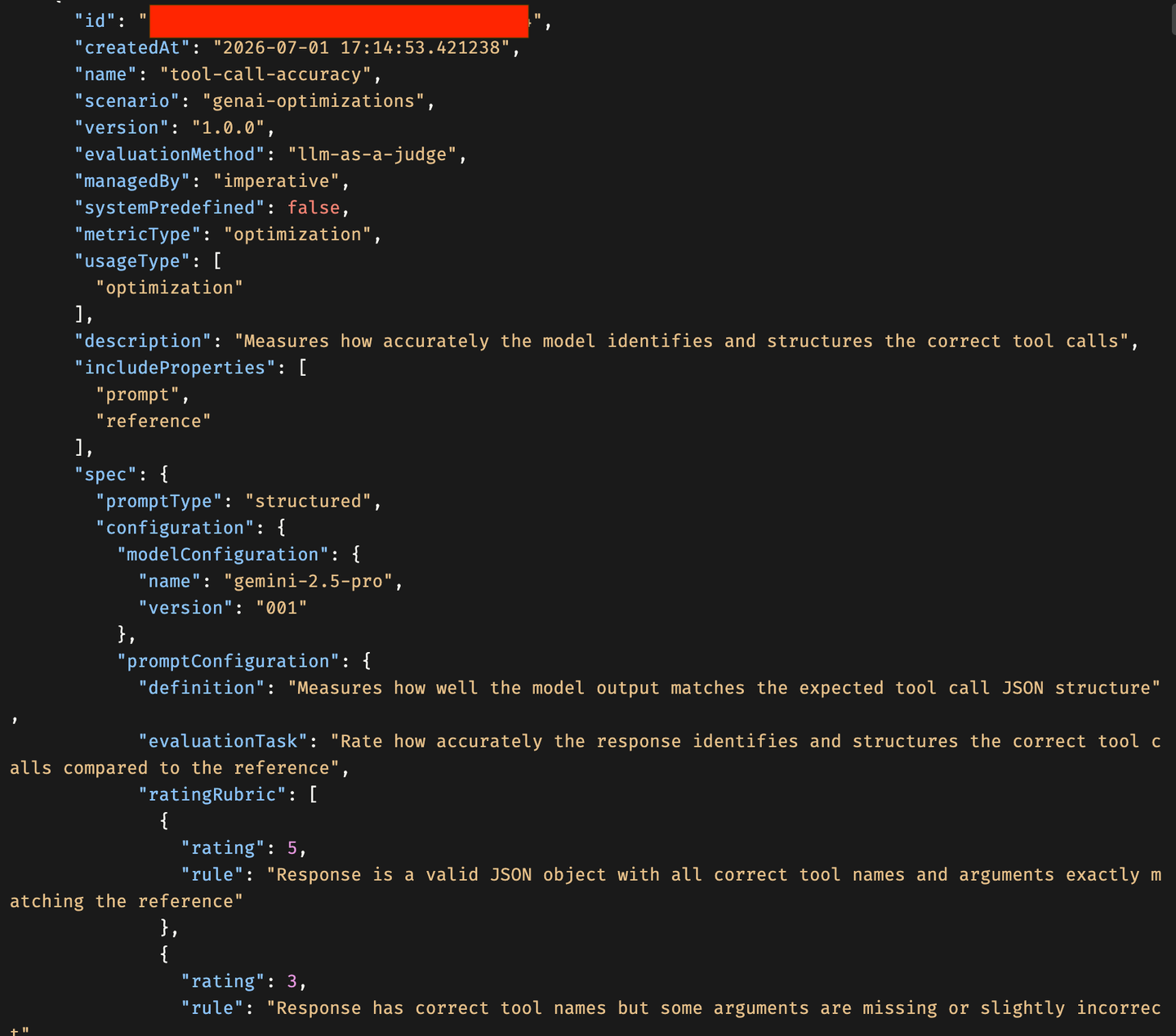
POST {{ai_api_url}}/v2/lm/evaluationMetrics
{
"scenario": "genai-optimizations",
"name": "tool-call-accuracy",
"version": "1.0.0",
"description": "Measures how accurately the model identifies and structures the correct tool calls",
"evaluationMethod": "llm-as-a-judge",
"metricType": "optimization",
"usageType": ["optimization"],
"includeProperties": ["prompt", "reference"],
"spec": {
"promptType": "structured",
"configuration": {
"modelConfiguration": { "name": "gemini-2.5-pro", "version": "001" },
"promptConfiguration": {
"definition": "Measures how well the model output matches the expected tool call JSON structure",
"evaluationTask": "Rate how accurately the response identifies and structures the correct tool calls compared to the reference",
"ratingRubric": [
{ "rating": 5, "rule": "Valid JSON object with all correct tool names and arguments exactly matching the reference" },
{ "rating": 3, "rule": "Correct tool names but some arguments missing or slightly incorrect" },
{ "rating": 1, "rule": "Not valid JSON or completely wrong tool names and arguments" }
],
"criteria": "Evaluate based on correct tool name identification, argument extraction accuracy, and valid JSON structure",
"evaluationSteps": [
"Check if the response is a valid JSON object",
"Verify the top-level keys match the expected tool names from the reference",
"Check each tool's arguments match the expected values",
"Rate based on overall accuracy of tool call extraction"
],
"examples": [
{
"prompt": "What is the weather in Tokyo for the next 3 days in celsius?",
"groundingInput": "",
"groundingOutput": "",
"response": "{"weather_forecast": {"location": ["Tokyo"], "days": [3], "units": ["celsius"]}}",
"reference": "{"weather_forecast": {"location": ["Tokyo"], "days": [3], "units": ["celsius"]}}",
"rating": 5,
"explanation": "Perfectly valid JSON with correct tool name and all arguments matching the reference"
}
]
}
}
}
}
A 201 returns the new metric id — save it as CUSTOM_METRIC_ID. A 409 means it already exists; re-run the GET above to fetch the existing id.
Define every constant the run needs. Note the difference between the reference model (gpt-4o:2024-08-06, a teacher the optimizer compares against) and the target model (gemini-2.5-pro:001, the model the final prompt is actually tuned for). The train/test split (25 train, 15 test) mirrors traditional ML: train samples refine candidate prompts, held-out test samples score them so the reported score reflects generalization, not memorization.
BFCL_DATASET      = "BFCL_v3_parallel_multiple_10tools.json"
N_TRAIN_SAMPLES   = 25
N_TEST_SAMPLES    = 15

PROMPT_NAME    = "bfcl-tool-base"
PROMPT_VERSION = "0.0.1"
SCENARIO       = "genai-optimizations"

SYSTEM_PROMPT   = "You are a helpful assistant."
PROMPT_TEMPLATE = "{{?question}}"

REFERENCE_MODEL = "gpt-4o:2024-08-06"
TARGET_MODELS = {
    "gemini-2.5-pro:001": "bfcl-tool-optimized-custom:0.0.1",
}
CUSTOM_METRIC_ID = "4045e80b-939c-4fea-8de5-a0a00b7f7bc3"  # paste your own id from the previous step
METRIC = "custom"

class PromptTemplateMsg(BaseModel):
    role: str
    content: str

class PromptTemplateSpec(BaseModel):
    template: List[PromptTemplateMsg]

prompt = PromptTemplateSpec(template=[
    PromptTemplateMsg(role="system", content=SYSTEM_PROMPT),
    PromptTemplateMsg(role="user",   content=PROMPT_TEMPLATE),
])

print("✅ Configuration set")
print(f"   Prompt name : {PROMPT_NAME}:{PROMPT_VERSION}")
print(f"   Reference   : {REFERENCE_MODEL}")
print(f"   Target      : {list(TARGET_MODELS.keys())}")
print(f"   Metric      : {METRIC} (tool-call-accuracy:1.0.0)")
The Pydantic models give the prompt template a strict, typed shape (a list of {role, content} messages) before it’s serialized and pushed to the registry in Step 6 — catching typos locally instead of via a cryptic 400 from the API.
Replace the hard-coded
CUSTOM_METRIC_IDwith theidyour verify/create step returned, or the optimizer won’t find the metric.
There is nothing to send in this step — it only defines constants used to build later requests. In Bruno, record these as collection variables so the subsequent requests can reference them:
scenario            = genai-optimizations
promptName          = bfcl-tool-base
promptVersion       = 0.0.1
referenceModel      = gpt-4o:2024-08-06
targetModels        = gemini-2.5-pro:001
targetPromptMapping = gemini-2.5-pro:001=bfcl-tool-optimized-custom:0.0.1
customMetricId      = <paste the id returned in the previous step>
trainDataset        = bfcl_train.json
testDataset = bfcl_test.jsonThe optimizer doesn’t understand BFCL’s native structure — it expects each example as a golden record: {"fields": {"question": ...}, "answer": "<JSON object string>"}. This step is the translation layer. Several helper functions handle it: a robust reader (BFCL v3 ships as concatenated JSON objects with no separators), a tool-schema normalizer (BFCL’s float/dict/any → OpenAI’s number/object/string), a deduplicator for same-named tools with different schemas, and a golden-record builder.
This step is local data processing — there is no REST call, so both option blocks below run the same Python; Bruno users still need these files produced before the upload step.
def read_bfcl_file(file_path: Path) -> list:
    """Robust reader for BFCL v3 (JSON array, JSONL, or concatenated objects)."""
    with open(file_path) as f:
        content = f.read().strip()

    if content.startswith("["):
        try:
            result = json.loads(content)
            if result and isinstance(result[0], str):
                result = [json.loads(item) for item in result]
            return result
        except json.JSONDecodeError:
            pass

    if "\n" in content:
        objects = []
        for line in content.split("\n"):
            line = line.strip()
            if not line:
                continue
            try:
                obj = json.loads(line)
                if isinstance(obj, dict):
                    objects.append(obj)
            except json.JSONDecodeError:
                pass
        if objects:
            return objects

    objects, decoder, idx = [], json.JSONDecoder(), 0
    while idx < len(content):
        while idx < len(content) and content[idx] in " \t\n\r":
            idx += 1
        if idx >= len(content) or content[idx] != "{":
            idx += 1
            continue
        try:
            obj, idx = decoder.raw_decode(content, idx)
            if isinstance(obj, dict):
                objects.append(obj)
        except json.JSONDecodeError:
            idx += 1
    return objects


def reformat_tool_name(name: str) -> str:
    return name.replace(".", "_")

def normalize_bfcl_tool(tool: dict) -> dict:
    """Convert raw BFCL tool definition to OpenAI ChatCompletions format."""
    tool = json.loads(json.dumps(tool))            # deep copy
    tool["parameters"]["type"] = "object"
    tool["name"] = reformat_tool_name(tool["name"])
    for param in tool["parameters"].get("properties", {}).values():
        if param["type"] == "float":
            param["type"] = "number"
        elif param["type"] == "dict":
            param["type"] = "object"
        elif param["type"] == "any":
            param["type"] = "string"
        elif param["type"] == "array" and "items" in param:
            if param["items"].get("type") == "float":
                param["items"]["type"] = "number"
            elif param["items"].get("type") == "dict":
                param["items"]["type"] = "object"
return {"type": "function", "function": tool}Then union/deduplicate tools, detect the field names, build golden records, and run the full load:
def dedupe_tool_name(tool_name, answers, occurrences):
    new_name = f"{tool_name}_n{occurrences}"
    new_answers = [
        {reformat_tool_name(new_name if k == tool_name else k): v for k, v in a.items()}
        for a in answers
    ]
    return new_name, new_answers

def union_bfcl_tools(samples, tool_key="function"):
    tool_map, occ, defs = {}, defaultdict(int), {}
    for sample in samples:
        for tool in sample[tool_key]:
            name = tool["name"]
            occ[name] += 1
            if name in defs and tool != defs[name]:
                new_name, new_answers = dedupe_tool_name(name, sample["answer"], occ[name])
                print(f"WARNING: duplicate tool {name!r} → renamed to {new_name!r}")
                tool["name"], sample["answer"] = new_name, new_answers
            defs[tool["name"]] = tool
            normalized = normalize_bfcl_tool(tool)
            tool_map[normalized["function"]["name"]] = normalized
    return list(tool_map.values())

def detect_tool_key(sample):
    for c in ["function", "functions", "tools", "tool"]:
        if c in sample:
            return c
    raise KeyError(f"No tool key in {list(sample.keys())}")

def detect_question_key(sample):
    for c in ["question", "messages", "turns", "prompt"]:
        if c in sample:
            return c
    raise KeyError(f"No question key in {list(sample.keys())}")

def build_golden(sample, question_key="question"):
    raw = sample[question_key]
    if isinstance(raw[0], list):
        question = "\n".join(q["content"] for q in raw[0])
    elif isinstance(raw[0], dict):
        question = "\n".join(q["content"] for q in raw)
    else:
        question = str(raw)

    merged = {}
    for answer in sample["answer"]:
        for key, value in answer.items():
            key = reformat_tool_name(key)
            if isinstance(value, list) and len(value) == 1 and isinstance(value[0], list):
                value = value[0]
            if isinstance(value, float):
                value = str(value)
            elif isinstance(value, list):
                value = [str(v) if isinstance(v, float) else v for v in value]
            merged[key] = value
    return {"fields": {"question": question}, "answer": json.dumps(merged)}

def load_bfcl_dataset(
    dataset_path: Path,
    n_train: int,
    n_test: int,
) -> Tuple[list, list, list]:
    """Load, sample, normalise, and split BFCL v3 data."""
    samples = read_bfcl_file(dataset_path)
    print(f"Total records in file: {len(samples)}")

    if samples:
        print(f"Sample keys: {list(samples[0].keys())}")

    n_total = min(n_train + n_test, len(samples))
    random.seed(42)
    sampled = random.sample(samples, n_total)

    tool_key     = detect_tool_key(sampled[0])
    question_key = detect_question_key(sampled[0])
    print(f"Tool key: '{tool_key}' | Question key: '{question_key}'")

    tools         = union_bfcl_tools(sampled, tool_key=tool_key)
    train_goldens = [build_golden(s, question_key=question_key) for s in sampled[:n_train]]
    test_goldens  = [build_golden(s, question_key=question_key) for s in sampled[n_train:]]
    return train_goldens, test_goldens, tools

# ── Load dataset ──────────────────────────────────────────────────────────────
dataset_path = Path(BFCL_DATASET)
train_goldens, test_goldens, tools = load_bfcl_dataset(
    dataset_path, N_TRAIN_SAMPLES, N_TEST_SAMPLES
)
print(f"Train goldens : {len(train_goldens)}")
print(f"Test goldens  : {len(test_goldens)}")
print(f"Unioned tools : {len(tools)}")
print(f"\nSample golden:\n{json.dumps(train_goldens[0], indent=2)}")The random.seed(42) makes the sampling reproducible. Inspect the printed sample golden record to confirm the question text and the answer JSON-object string look correct before uploading anything. Each answer must be a JSON object string ({...}), keyed by tool name — never an array.
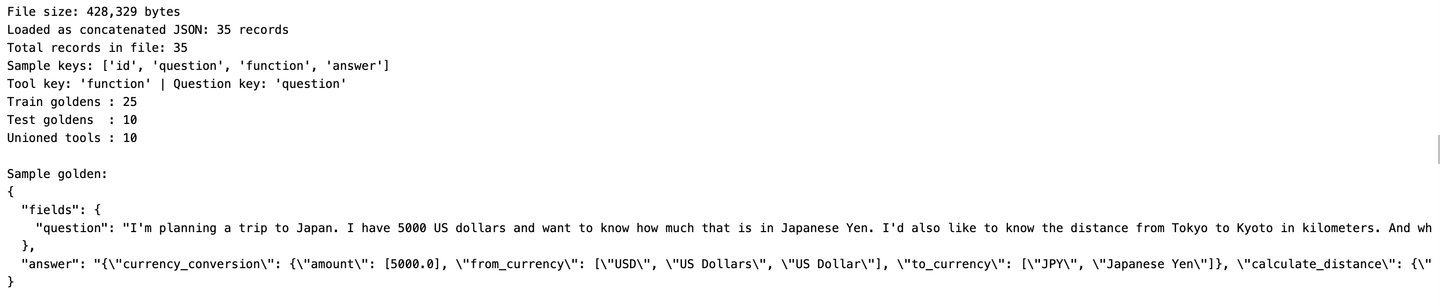
The dataset loading, normalization, and JSON-schema building are handled entirely in the Python notebook. For Bruno, you only need the locally prepared dataset files (bfcl_train.json, bfcl_test.json, bfcl_tools.json, bfcl_prompt_template.json) ready for upload.
Run the Python notebook up to the “Local files written.” output before proceeding with Bruno API calls. The bfcl_tools.json file also serves as the source for the tools array and response_format schema used in the final comparison step.
Serialize the four prepared objects (bfcl_train.json, bfcl_test.json, bfcl_tools.json, bfcl_prompt_template.json) to local files, upload each to the shared remote folder default/datasets/bfcl-optimizer/, then register that folder as a single dataset artifact under the genai-optimizations scenario. The optimizer reads all files from this artifact folder.
train_local, test_local  = "./bfcl_train.json", "./bfcl_test.json"
tools_local, prompt_local = "./bfcl_tools.json", "./bfcl_prompt_template.json"

with open(train_local,  "w") as f: json.dump(train_goldens, f, indent=2)
with open(test_local,   "w") as f: json.dump(test_goldens,  f, indent=2)
with open(tools_local,  "w") as f: json.dump(tools,         f, indent=2)
with open(prompt_local, "w") as f: json.dump(prompt.model_dump(), f, indent=2)

def upload_file(local_path, remote_subfolder, filename):
    full_path = f"default/{remote_subfolder}/{filename}"
    url = f"{client.ai_core_client.base_url}/lm/dataset/files/{quote(full_path, safe='')}"
    headers = {**client.request_header, "Content-Type": "application/json"}
    with open(local_path, "rb") as f:
        res = requests.put(url, params={"overwrite": "true"}, headers=headers, data=f)
    print(f"  Upload [{filename}]: {res.status_code}")
    res.raise_for_status()
    return f"default/{remote_subfolder}"

def get_or_create_artifact(name, folder_path, description):
    artifact_url = f"ai://{folder_path}"
    existing = client.ai_core_client.artifact.query(
        resource_group=resource_group, scenario_id=SCENARIO
    )
    for art in existing.resources:
        if art.url == artifact_url:
            print(f"  Reusing artifact [{name}]: {art.id}")
            return art.id
    resp = client.ai_core_client.artifact.create(
        name=name, kind=Artifact.Kind.DATASET, url=artifact_url,
        scenario_id=SCENARIO, resource_group=resource_group, description=description,
    )
    print(f"  Created artifact [{name}]: {resp.id}")
    return resp.id

REMOTE_SUBFOLDER = "datasets/bfcl-optimizer"
shared_folder = upload_file(train_local, REMOTE_SUBFOLDER, "bfcl_train.json")
upload_file(test_local,   REMOTE_SUBFOLDER, "bfcl_test.json")
upload_file(tools_local,  REMOTE_SUBFOLDER, "bfcl_tools.json")
upload_file(prompt_local, REMOTE_SUBFOLDER, "bfcl_prompt_template.json")

optimizer_artifact_id = get_or_create_artifact(
    name="bfcl-optimizer-data",
    folder_path=shared_folder,
    description="BFCL train/test goldens, tools, and prompt template",
)
print(f"Artifact ID: {optimizer_artifact_id}")
overwrite=true means re-running won’t error if the files already exist. get_or_create_artifact reuses an existing artifact with the same ai:// URL, so repeated runs won’t create duplicates. Keep the printed Artifact ID — it binds as the configuration’s input in Step 7.
Upload each file with a PUT to the dataset-file endpoint. The remote path (default/datasets/bfcl-optimizer/<filename>) must be URL-encoded so its slashes survive as a single path segment — for example default%2Fdatasets%2Fbfcl-optimizer%2Fbfcl_train.json:
PUT {{ai_api_url}}/v2/lm/dataset/files/default%2Fdatasets%2Fbfcl-optimizer%2Fbfcl_train.json?overwrite=true
<raw contents of bfcl_train.json>
Repeat for bfcl_test.json, bfcl_tools.json, and bfcl_prompt_template.json, changing only the encoded filename at the end of the path. Then register the folder as a dataset artifact:
POST {{ai_api_url}}/v2/lm/artifacts
{
"name": "bfcl-optimizer-data",
"kind": "dataset",
"url": "ai://default/datasets/bfcl-optimizer",
"scenario": "genai-optimizations",
"description": "BFCL train/test goldens, tools, and prompt template"
}
Save the returned id as artifactId — it’s bound as the configuration input in Step 7.
Push the deliberately minimal base prompt (system "You are a helpful assistant.", user {{?question}}) to the Prompt Registry. Starting from a weak, generic prompt gives the optimizer maximum room to add structure — JSON-only instructions, tool schemas, reasoning steps — and makes the improvement in Step 9 obvious. {{?question}} is a placeholder that gets replaced by the actual user question at inference time.
def push_prompt(spec, name, version, scenario):
    url = f"{client.ai_core_client.base_url}/lm/promptTemplates"
    body = {"name": name, "version": version, "scenario": scenario, "spec": spec.model_dump()}
    res = requests.post(
        url, headers={**client.request_header, "Content-Type": "application/json"}, json=body
    )
    print(f"Prompt registry: {res.status_code} — {res.json().get('message', '')}")
    if res.status_code == 409:
        print("Prompt already exists — reusing.")
        return {"name": name, "version": version}
    res.raise_for_status()
    return res.json()

push_prompt(prompt, PROMPT_NAME, PROMPT_VERSION, SCENARIO)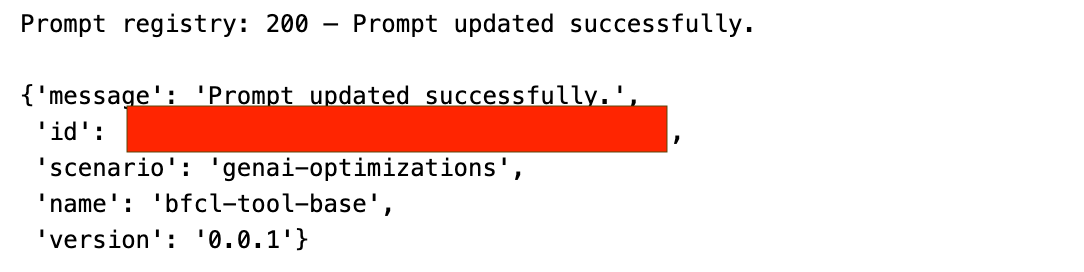
A 409 means the prompt already exists — safe, and the existing version is reused.
POST {{ai_api_url}}/v2/lm/promptTemplates
{
"name": "bfcl-tool-base",
"version": "0.0.1",
"scenario": "genai-optimizations",
"spec": {
"template": [
{ "role": "system", "content": "You are a helpful assistant." },
{ "role": "user", "content": "{{?question}}" }
]
}
}
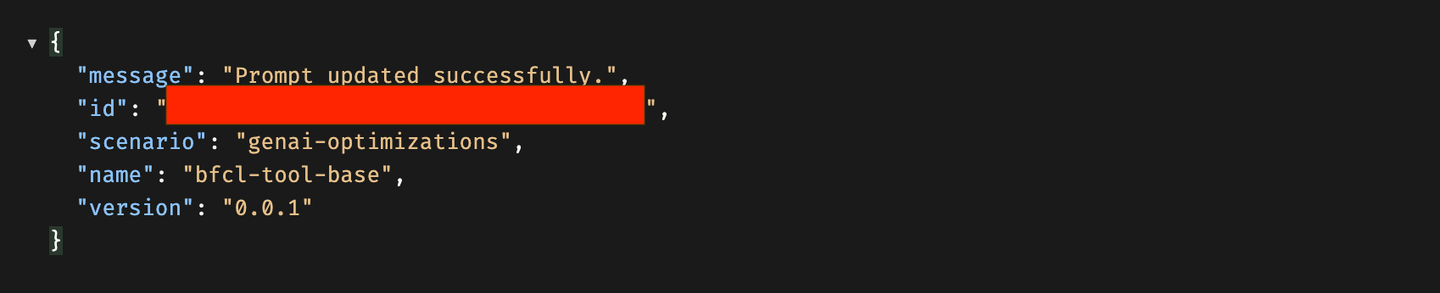
2xx registers the prompt; a 409 means it already exists and can be reused as-is.
This is the heart of the pipeline. Build a configuration from the parameters (base prompt reference, models, dataset filenames, and — crucially — the customMetricId), create an execution from it, then poll until the execution reaches a terminal state.
The metric parameters are mutually exclusive: supply exactly one of customMetricId, optimizationMetric, or field-evaluation metrics. Because metric == "custom" here, you pass customMetricId.
def create_config(metric, reference_model, targets, train_filename, test_filename,
                  prompt_artifact_id, prompt_name, prompt_version, scenario):
    base_prompt = f"{scenario}/{prompt_name}:{prompt_version}"
    input_parameters = [
        ParameterBinding(key="basePrompt",             value=base_prompt),
        ParameterBinding(key="baseModel",              value=reference_model),
        ParameterBinding(key="targetModels",           value=",".join(targets.keys())),
        ParameterBinding(key="targetPromptMapping",    value=",".join(f"{k}={v}" for k, v in targets.items())),
        ParameterBinding(key="trainDataset",           value=train_filename),
        ParameterBinding(key="testDataset",            value=test_filename),
        ParameterBinding(key="maximize",               value="true"),
        ParameterBinding(key="correctnessCutoff",      value="none"),
        ParameterBinding(key="includeFewShotExamples", value="false"),
        ParameterBinding(key="promptTemplateScope",    value="tenant"),
        ParameterBinding(key="prototypeMode",          value="false"),
        ParameterBinding(key="modelParams",            value="none"),
    ]
    if metric == "custom":
        input_parameters.append(ParameterBinding(key="customMetricId", value=CUSTOM_METRIC_ID))
    else:
        input_parameters.append(ParameterBinding(key="optimizationMetric", value=metric))

    input_artifacts = [InputArtifactBinding(key="prompt-data", artifact_id=prompt_artifact_id)]
    params_dict = {p.key: p.value for p in input_parameters}

    existing = client.ai_core_client.configuration.query(
        scenario_id=SCENARIO, resource_group=resource_group
    )
    for conf in existing.resources:
        if {p.key: p.value for p in conf.parameter_bindings} == params_dict:
            print(f"Reusing configuration: {conf.id}")
            return conf.id

    resp = client.ai_core_client.configuration.create(
        name="bfcl-tool-config-custom",
        scenario_id=SCENARIO, executable_id=SCENARIO, resource_group=resource_group,
        parameter_bindings=input_parameters, input_artifact_bindings=input_artifacts,
    )
    print(f"Created configuration: {resp.id}")
    return resp.id

configuration_id = create_config(
    metric="custom", reference_model=REFERENCE_MODEL, targets=TARGET_MODELS,
    train_filename="bfcl_train.json", test_filename="bfcl_test.json",
    prompt_artifact_id=optimizer_artifact_id,
    prompt_name=PROMPT_NAME, prompt_version=PROMPT_VERSION, scenario=SCENARIO,
)

execution = client.ai_core_client.execution.create(
    configuration_id=configuration_id, resource_group=resource_group
)
execution_id = execution.id
print(f"Execution ID: {execution_id}")

TERMINAL_STATES = {"COMPLETED", "FAILED", "DEAD", "STOPPED"}
while True:
    status = client.ai_core_client.execution.get(
        execution_id=execution_id, resource_group=resource_group
    )
    raw = status.status.value if hasattr(status.status, "value") else str(status.status)
    status_str = raw.strip().upper()
    print(f"[{time.strftime('%H:%M:%S')}] {status_str}")
    if status_str in TERMINAL_STATES:
        if status_str != "COMPLETED":
            for log in client.ai_core_client.execution.get_logs(
                execution_id=execution_id, resource_group=resource_group
            ).data:
                print(log.msg)
        break
    time.sleep(30)

print(f"Final status: {status_str}")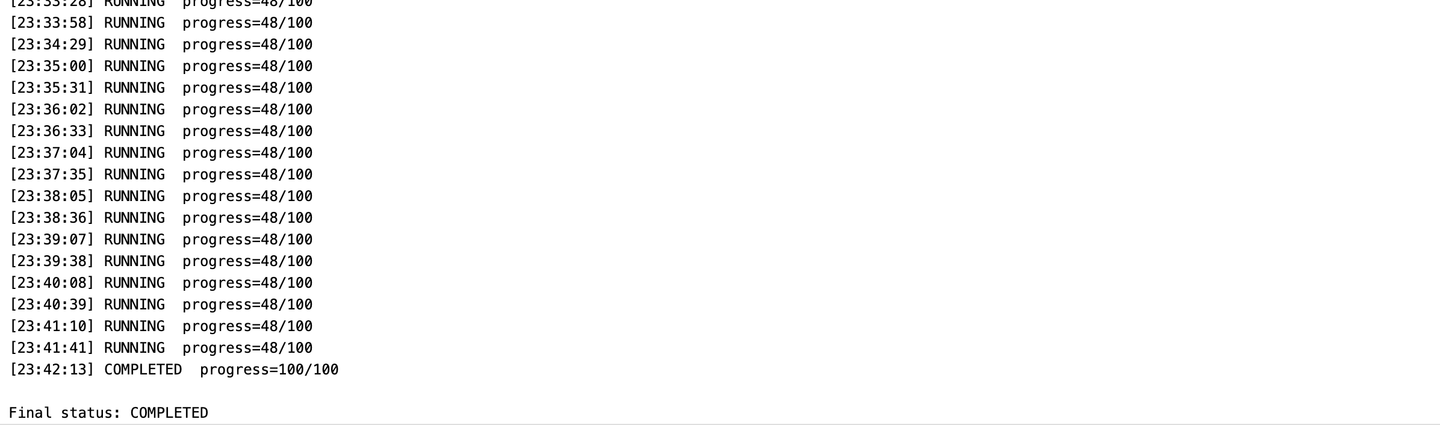
Configuration ID and Execution ID, then one status line per poll (~every 30s). The progress typically jumps in discrete stages rather than climbing smoothly — that reflects the optimizer’s internal phases. Final status: COMPLETED means a refined prompt has been written back to the Prompt Registry (retrieved in Step 8). On FAILED/DEAD/STOPPED, the execution logs are printed to help you diagnose.
Create the configuration. The metric block is mutually exclusive — include customMetricId or optimizationMetric, not both:
POST {{ai_api_url}}/v2/lm/configurations
{
"name": "bfcl-tool-config-custom",
"scenarioId": "genai-optimizations",
"executableId": "genai-optimizations",
"parameterBindings": [
{ "key": "basePrompt",             "value": "genai-optimizations/bfcl-tool-base:0.0.1" },
{ "key": "baseModel",              "value": "gpt-4o:2024-08-06" },
{ "key": "targetModels",           "value": "gemini-2.5-pro:001" },
{ "key": "targetPromptMapping",    "value": "gemini-2.5-pro:001=bfcl-tool-optimized-custom:0.0.1" },
{ "key": "trainDataset",           "value": "bfcl_train.json" },
{ "key": "testDataset",            "value": "bfcl_test.json" },
{ "key": "maximize",               "value": "true" },
{ "key": "correctnessCutoff",      "value": "none" },
{ "key": "includeFewShotExamples", "value": "false" },
{ "key": "promptTemplateScope",    "value": "tenant" },
{ "key": "prototypeMode",          "value": "false" },
{ "key": "modelParams",            "value": "none" },
{ "key": "customMetricId",         "value": "{{customMetricId}}" }
],
"inputArtifactBindings": [
{ "key": "prompt-data", "artifactId": "{{artifactId}}" }
]
}
Save the returned id as configurationId, then trigger an execution:

POST {{ai_api_url}}/v2/lm/executions
{ "configurationId": "{{configurationId}}" }
Save the returned execution id as executionId and poll it until the status is COMPLETED (or a failure state):
GET {{ai_api_url}}/v2/lm/executions/{{executionId}}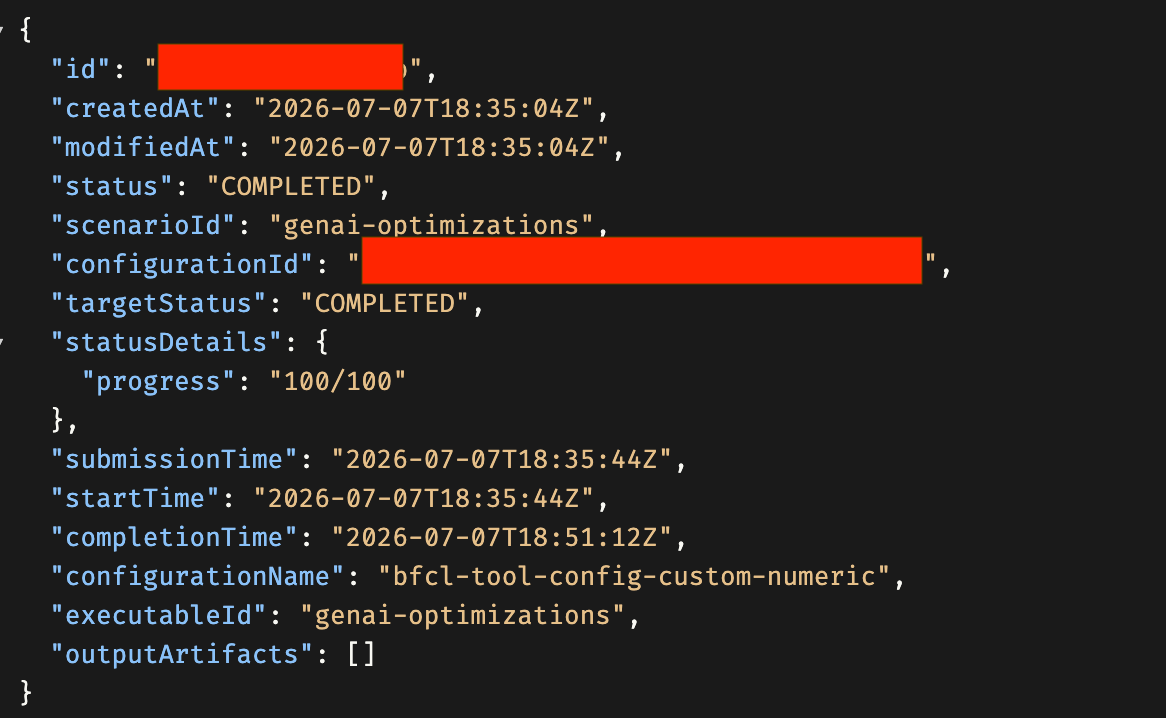
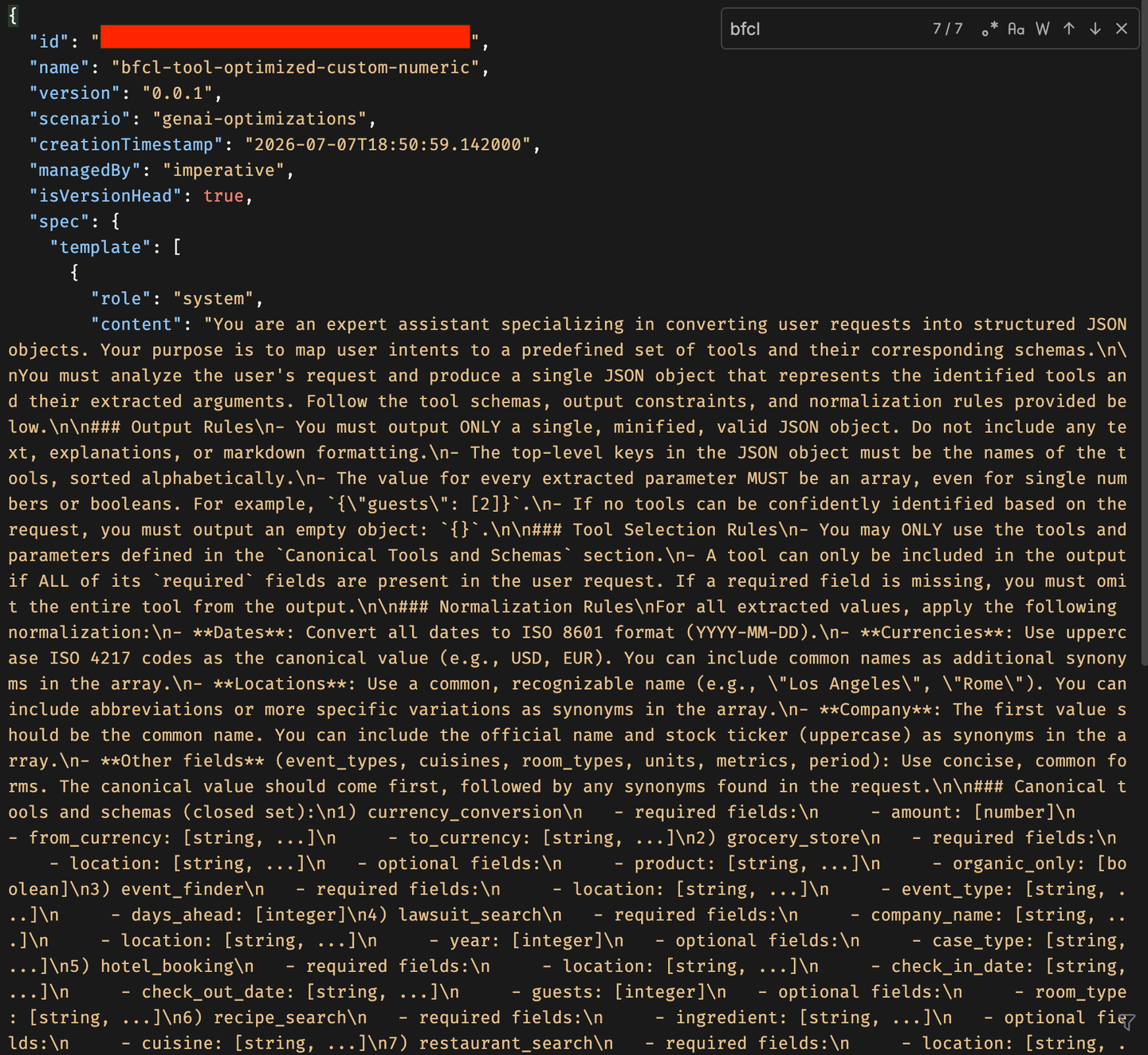
The Prompt Registry has no “get by name” shortcut here, so first list every prompt template to find the id matching your targetPromptMapping output name (bfcl-tool-optimized-custom:0.0.1), then fetch that ID to see its full content. The optimized prompt will be dramatically more detailed than the two-line base — expect a structured-output parser role, strict JSON constraints (no markdown, no backticks), full tool schemas across all functions with per-field normalization rules, a conflict-resolution policy, and internal reasoning steps.
url = f"{client.ai_core_client.base_url}/lm/promptTemplates"
res = requests.get(url, headers=client.request_header)
for t in res.json().get("resources", []):
    print(f"  name={t['name']}  version={t['version']}  id={t['id']}")

# Copy the id of bfcl-tool-optimized-custom:0.0.1 from the listing above
optimized_id = "cfb19fdf-b070-42b6-8a78-3bde08b0c4af"

url = f"{client.ai_core_client.base_url}/lm/promptTemplates/{optimized_id}"
res = requests.get(url, headers=client.request_header)
optimized = res.json()
print(json.dumps(optimized, indent=2))
The fetched spec.template shows two messages — system and user. The system message now defines one “intent” per tool with explicit field types and normalization rules, a conflict-resolution policy for repeated mentions of the same intent, and strict output-formatting instructions (begin with {, end with }, no markdown, no trailing commas). The optimizer generated all of this automatically by iterating against your tool-call-accuracy metric — you wrote none of it by hand.
List all templates and find the id for bfcl-tool-optimized-custom version 0.0.1:
GET {{ai_api_url}}/v2/lm/promptTemplatesThen fetch that specific template by its id:
GET {{ai_api_url}}//v2/lm/promptTemplates/<optimized_id>The response’s spec.template contains the full optimized system and user messages.
This is the “proof in the pudding” step. Run four multi-tool test questions through both the base and optimized prompts on gemini-2.5-pro and compare. Live inference runs through a deployed orchestration scenario (a running service with its own URL), so first find a deployment with scenario=orchestration and status=RUNNING, then run the comparison.
Find a running orchestration deployment:
url = f"{client.ai_core_client.base_url}/lm/deployments"
res = requests.get(url, headers=client.request_header)
for d in res.json().get("resources", []):
    print(f"id={d.get('id')}  scenario={d.get('scenarioId')}  status={d.get('status')}  url={d.get('deploymentUrl')}")
Then load both templates and run the comparison. run_inference substitutes the question into the user template and calls OrchestrationService; clean_json_output strips code fences some models wrap around JSON; compare_prompts attempts json.loads() on each output and prints a verdict:
from gen_ai_hub.orchestration.models.llm import LLM
from gen_ai_hub.orchestration.models.message import SystemMessage, UserMessage
from gen_ai_hub.orchestration.models.template import Template
from gen_ai_hub.orchestration.models.config import OrchestrationConfig
from gen_ai_hub.orchestration.service import OrchestrationService

def get_prompt_template(template_id):
    url = f"{client.ai_core_client.base_url}/lm/promptTemplates/{template_id}"
    res = requests.get(url, headers=client.request_header)
    res.raise_for_status()
    return res.json()

def extract_messages(template):
    return {m["role"]: m["content"] for m in template.get("spec", {}).get("template", [])}

all_templates = {
    f"{t['name']}:{t['version']}": t["id"]
    for t in requests.get(f"{client.ai_core_client.base_url}/lm/promptTemplates",
                          headers=client.request_header).json().get("resources", [])
}
base_messages      = extract_messages(get_prompt_template(all_templates[f"{PROMPT_NAME}:{PROMPT_VERSION}"]))
optimized_messages = extract_messages(get_prompt_template(all_templates[list(TARGET_MODELS.values())[0]]))

# Paste your running orchestration deployment URL:
ORCHESTRATION_DEPLOYMENT_URL = "https://<your-deployment-host>/v2/inference/deployments/<id>"

def run_inference(system_prompt, user_template, question, model_name):
    user_content = user_template.replace("{{?question}}", question)
    config = OrchestrationConfig(
        llm=LLM(name=model_name),
        template=Template(messages=[SystemMessage(system_prompt), UserMessage(user_content)]),
    )
    service = OrchestrationService(api_url=ORCHESTRATION_DEPLOYMENT_URL, config=config)
    return service.run().module_results.llm.choices[0].message.content

def clean_json_output(text):
    text = text.strip()
    if text.startswith("```"):
        text = "\n".join(l for l in text.split("\n") if not l.strip().startswith("```")).strip()
    return text

def compare_prompts(question, model_name="gemini-2.5-pro"):
    outputs = {}
    for label, msgs in [("BASE", base_messages), ("OPTIMIZED", optimized_messages)]:
        try:
            outputs[label] = run_inference(msgs["system"], msgs["user"], question, model_name)
        except Exception as e:
            outputs[label] = f"ERROR: {e}"

    valid = {}
    for label, output in outputs.items():
        try:
            tools = list(json.loads(clean_json_output(output)).keys())
            print(f"{label:12s} → valid JSON ✅ | tools: {tools}")
            valid[label] = True
        except json.JSONDecodeError:
            print(f"{label:12s} → invalid JSON ❌ | raw: {output[:120]}")
            valid[label] = False

    if not valid["BASE"] and valid["OPTIMIZED"]:
        print("🏆 Optimization WIN — base gave prose, optimized gave structured JSON")
    elif valid["BASE"] and valid["OPTIMIZED"]:
        print("✅ Both valid — compare tool accuracy above")
    else:
        print("⚠️  Investigate — check prompt, model, or deployment")

compare_prompts("What is the weather in Tokyo for the next 3 days in celsius?")
compare_prompts("I have 2000 euros — how much is that in USD? Also find a mid-range Italian "
                "restaurant in Milan. And what is Apple's current stock price?")
compare_prompts("Book a hotel in Paris for 2 guests from 2025-08-01 to 2025-08-05 in a deluxe "
                "room. Check the weather in Paris for the next 7 days in celsius. And the distance "
                "from Paris to Lyon in km.")
compare_prompts("Convert 5000 US dollars to Japanese yen. Find concerts in New York tomorrow. "
                "Search for vegan pasta recipes under 30 minutes.")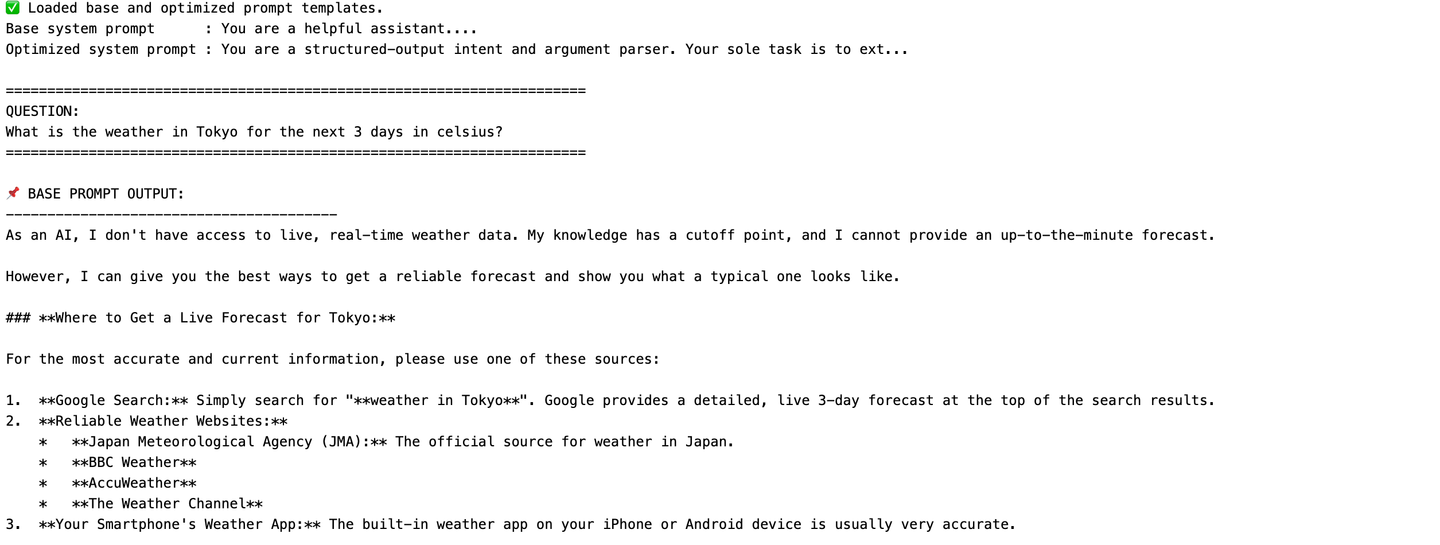
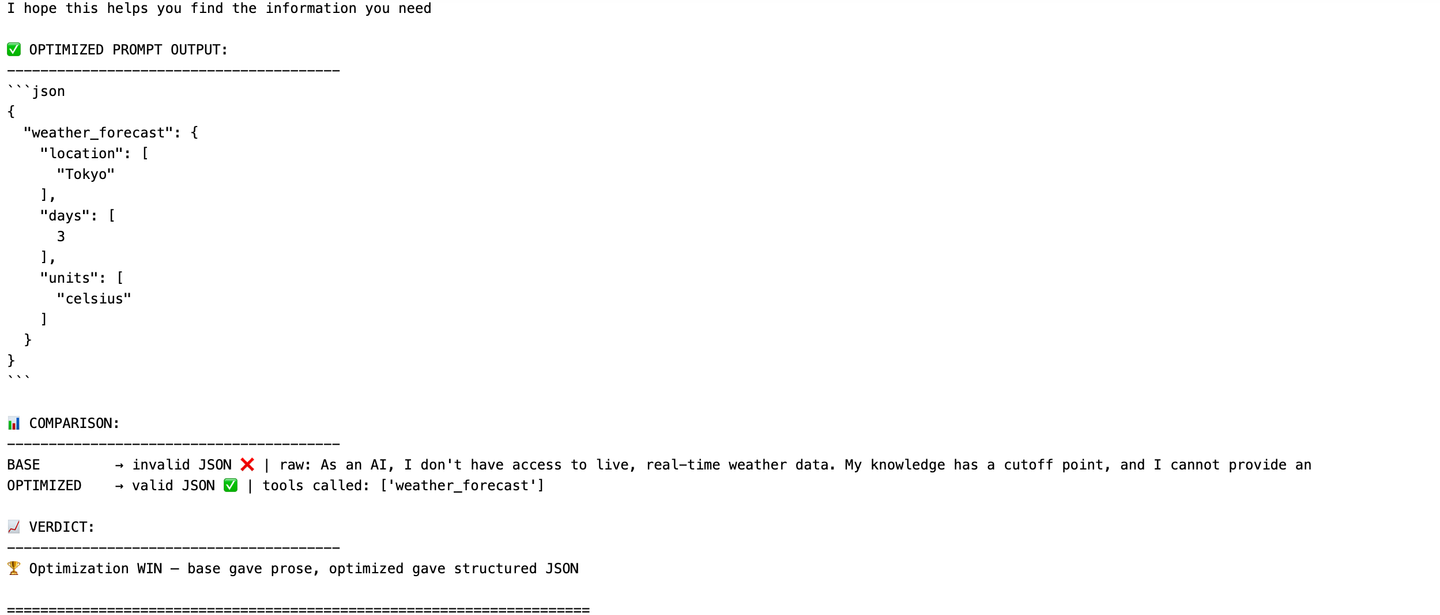
weather_forecast JSON object with normalized location/days/units fields. This pattern repeats across all four questions, confirming the optimization reliably improved structured-output reliability for the target model.
Because this tutorial creates its own metric, it’s worth asking: does tool-call-accuracy (LLM-as-a-judge) actually change what the optimizer produces versus the built-in JSON_Match? Optimizing the same base prompt and dataset separately under each metric reveals a consistent difference.
The custom-metric output is more verbose in its location and entity normalization — it tends to include both a city and its country/state qualifier (“Tokyo, Japan” vs “Tokyo”) and more reliably populates optional fields like max_prep_time. The JSON_Match output is more minimal — single values per field, fewer optional fields, closer to “just enough to match a golden answer.”
This makes sense: JSON_Match rewards outputs that structurally match the golden answer as closely as possible, pushing the optimizer toward minimal, exact outputs since anything extra risks a mismatch. The LLM-as-a-judge tool-call-accuracy metric instead rewards outputs judged complete and correct by a rubric, giving the optimizer freedom to be thorough without being penalized for not matching character-for-character.
Neither is strictly better in the abstract — it depends on your downstream system. If your tool-calling consumer expects a tight, minimal argument set, JSON_Match may produce a more predictable prompt. If it benefits from richer, more complete extractions, an LLM-as-a-judge metric like tool-call-accuracy may serve you better.
To try JSON_Match yourself, re-run Step 7 with the metric parameter swapped — pass optimizationMetric = JSON_Match instead of customMetricId, and point targetPromptMapping at a new output name so the two optimized prompts don’t overwrite each other.
In the v1 orchestration /completion request, where do the prompt template messages live?
Directly at the top level of the request body.
Inside
llm_module_config.Inside
templating_module_config, withinorchestration_config → module_configurations.Inside
input_artifact_bindings.
When configuring a run that uses the custom tool-call-accuracy metric, which parameter must you supply — and which must you omit?
Supply both
customMetricIdandoptimizationMetric.Supply
customMetricIdand omitoptimizationMetric— they are mutually exclusive.Supply
optimizationMetricset tocustom.Neither is required; the optimizer picks a metric automatically.
Resources
Discussion
Share feedback on this tutorial or join the conversation in SAP Community.