
Overview
You will learn
- How to add missing entitlements to your trial subaccount
- How to move entitlements from one subaccount to another


Prerequisites
- You have registered for a trial account on SAP Business Technology Platform: Get a Free Account on SAP BTP Trial.
Steps
Before you get started, you should understand the difference between entitlements and quota, because you’ll encounter these 2 terms quite often.
Entitlements are your right to provision and consume a resource. They refer to what you’re entitled to use (e.g., which services and service plans).
Quota is the numeric quantity that defines the maximum allowed consumption of that resource. In other words, how much of a service plan you’re entitled to use.
Entitlements and quotas are managed at the global account level, distributed to directories and subaccounts, and consumed by the subaccounts.
When you remove quotas or entitlements from a subaccount, they become available again at global account level and can be assigned to other subaccounts.
When you sign up for a trial account, you get a subaccount called trial automatically created for you, and all trial entitlements assigned to it by default. If you choose to create an additional subaccount and try things out there, you need to manually move the entitlements from the default subaccount to the new subaccount. You may want to:
Move over all trial entitlements.
Move over only some of them.
Split quota for a service plan between the 2 subaccounts.
Each service has one or more service plans available. A service plan is the representation of the costs and benefits for a given variant of a particular service. For instance, a database may be configured with various “T-shirt sizes”, each of which is a different service plan.
Some service plans use numeric quota, which means that you can increase or decrease the number of units available in a subaccount. Depending on the service, these units represent different things and may impact the amount of service instances, applications or routes you can have in a subaccount.
There are also service plans where the quota is simply shown as “limited”. In that case, you can entitle that service to multiple subaccounts without having to worry about how much of it to distribute to each subaccount. You can think of assigning entitlements for such service plans as “enabling” subaccounts to use them.
There are several places in the cockpit where you can view and configure entitlements and quotas for subaccounts:
at global account level
at subaccount level
You can also use directories to distribute entitlements. To find out more about directories, see the documentation on Directories.
In this tutorial, you’ll work on global account level. You have one global account that is your trial account.
You’re most likely here because you did not get all the service plans available on trial automatically entitled to the default trial subaccount that was created for you. In this step, you will fix that.
Go to the [SAP BTP Trial] (https://cockpit.hanatrial.ondemand.com/cockpit/#/home/trial) homepage and click Enter Your Trial Account.
Use the side navigation to go to Entitlements > Entity Assignments.
In the dropdown menus, choose Show: > Subaccounts and Subaccounts: > trial and then choose Go.

Entity Assignment Choosing Trial This loads a table with all the existing entitlements and quota assigned to that subaccount.
Click on Configure Entitlements to enter edit mode for that subaccount.
Once in edit mode, you can change quotas for existing service plans, add new service plans to the subaccount or remove service plans from that subaccount to make them available again at global account level.
Right now, you want to add missing entitlements, so choose Add Service Plans. Have a look at the following example. Please note that you need to enable entitlements according to your needs:

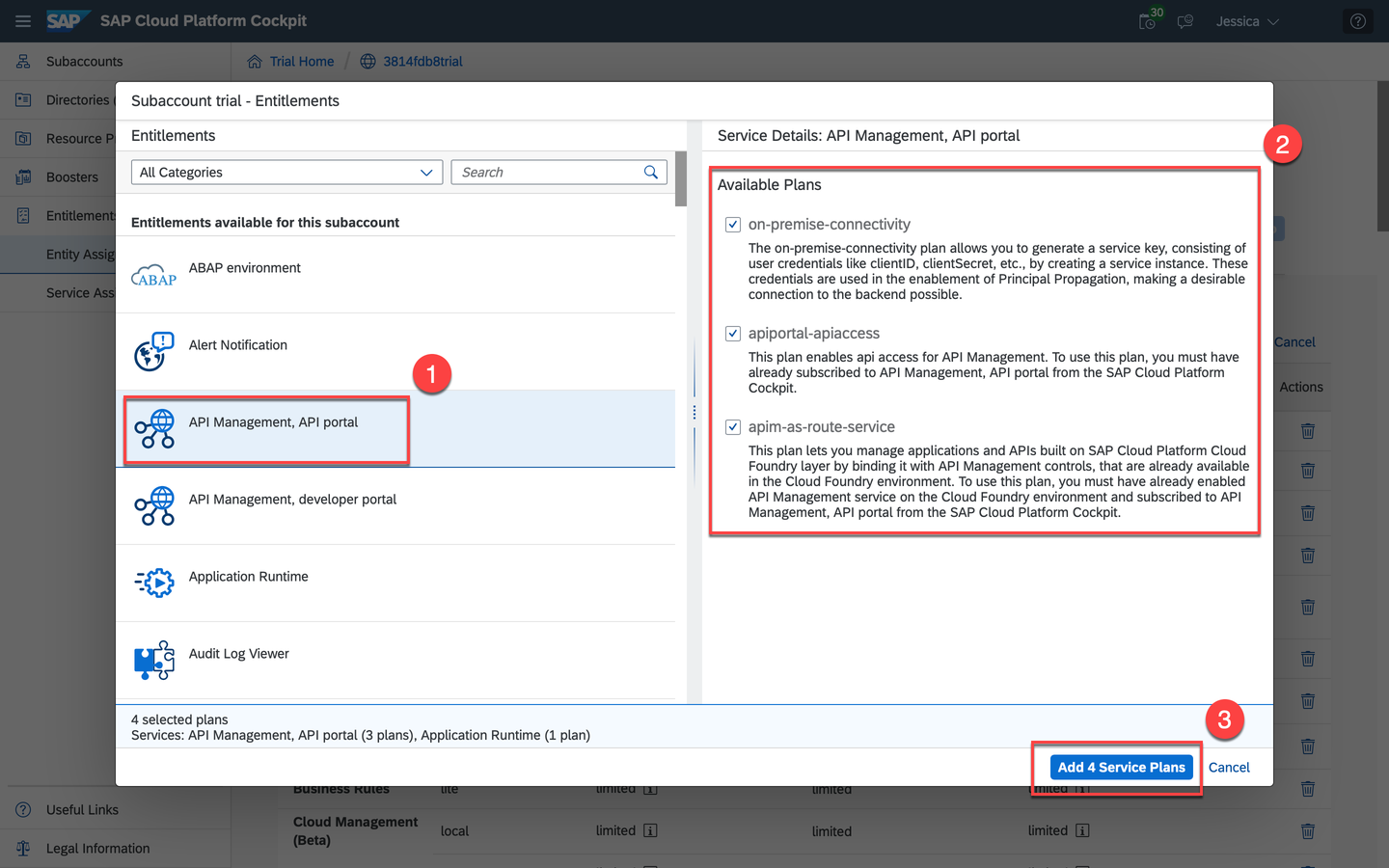
Click Configure Entitlemts In the dialog that opens, you have a list of all services available on trial on the left. You have to go through each of these services and make sure you add any missing service plans to your subaccount.
To do so, start from the top and select a service from the list. On the right you will see all the service plans available for that service. If the plan is not already selected and greyed out, select it, then move on to the next service until you have checked all of them. If you have been directed to this tutorial because you are missing a specific entitlement, now is the time to add the service plan you need.
Once you’re done, choose Add <x> Service Plans at the bottom of the dialog to confirm your selection.
Save Service Plans You’re still in edit mode for the subaccount, so choose Save to confirm changes made to the subaccount entitlements and exit edit mode.
You can now use all these services available on trial in your subaccount.
When you sign up for a trial account, you get a subaccount called trial automatically created for you, and all trial entitlements assigned to it by default. If you choose to create an additional subaccount and try things out there, you need to manually move the entitlements from the default subaccount to the new subaccount. You may want to move over all trial entitlements, only some of them, or even split quota for a service plan between the 2 subaccounts.
Go to the SAP BTP Trial homepage and click Enter Your Trial Account.
Use the side navigation to go to Entitlements > Entity Assignments.
In the dropdown menu, select both subaccounts and choose Go.
You will see 2 tables, one for each subaccount.
First, you need to remove entitlements from the default subaccount to make them available at global account level again and be able to reassign them. Choose Configure Entitlements above the table for the trial subaccount to enter edit mode.
You can only edit one subaccount at a time.
Once you’re in edit mode, you have 2 options: completely remove a service plan from the subaccount or remove some of the quota for a specific service plan.
To completely remove a service plan: Click on the trashcan icon under Actions for that specific service plan.
To remove quota for a service plan: In the Quota column, choose the +/- buttons to adjust the amount you want to keep in the default subaccount.

Free Some Quota When you’re done removing all the service plans and/or quotas from the default subaccount, choose Save to exit edit mode for the trial subaccount.
Now that the entitlements and quotas you removed are free at global account level, you can assign them to your new subaccount. Enter edit mode for this subaccount by choosing Configure Entitlements above its table.
Similar to Step 2, choose Add Service Plans and in the dialog select all the services and plans you want to add to your new subaccount.
Don’t forget to increase the quota to the amount you need.
- When you’re done adding everything, choose Save to confirm your changes and exit edit mode for that subaccount.
You’ve now changed the entitlements and quota distribution across your 2 subaccounts and are ready to deploy applications and create service instances in your new subaccount.
Resources
Discussion
Share feedback on this tutorial or join the conversation in SAP Community.