
Overview
You will learn
- How the Tabular AI flow is structured: deployment, context registry, prediction.
- How to create a configuration and a virtual deployment for the
tabular-orchestrationscenario. - How to register a data destination pointing at a dataset in SAP HANA Data Lake Files.
- How to register a tabular artifact with CSN metadata, and a scenario configuration that binds data to predictions.
- How to mark target cells with
[PREDICT]and declare them intargetColumns. - How each context selection strategy works, and which one requires an
indexColumn. - How to read the prediction response, including confidence scores and retrieved context size.
- How to compare strategies to judge whether retrieval is actually helping.


Prerequisites
- BTP Account
Set up your SAP Business Technology Platform (BTP) account.
Create a BTP Account - For SAP Developers or Employees
Internal SAP stakeholders should refer to the following documentation: How to create BTP Account For Internal SAP Employee, SAP AI Core Internal Documentation - For External Developers, Customers, or Partners
Follow this tutorial to set up your environment and entitlements: External Developer Setup Tutorial, SAP AI Core External Documentation - Create BTP Instance and Service Key for SAP AI Core
Follow the steps to create an instance and generate a service key for SAP AI Core:
Create Service Key and Instance - AI Core Setup Guide
Step-by-step guide to set up and get started with SAP AI Core:
AI Core Setup Tutorial - An Extended SAP AI Core service plan is required, as the Generative AI Hub is not available in the Free or Standard tiers. For more details, refer to
SAP AI Core Service Plans - You have access to the
tabular-orchestrationscenario in your resource group, and the Tabular AI feature is enabled in your landscape. - A tabular dataset (CSV) uploaded to a storage location that Tabular AI can read — this tutorial uses SAP HANA Data Lake Files with a used-cars dataset. The dataset used in this tutorial is available here
- Read access to that storage from your resource group. HDL Files authorizes clients by certificate: the subject pattern of your resource group’s certificate must be registered in the HDL instance, otherwise reads fail with
401 ... may not be registered in HDL.
Steps
Before starting this tutorial, ensure that you:
- Understand the basics of Generative AI workflows in SAP AI Core.
- Are familiar with creating configurations and deployments in SAP AI Core.
- Understand the distinction between the two kinds of configuration used here — they are easy to confuse:
- Configuration / virtual deployment — the usual AI Core deployment pair that gives you an inference endpoint.
- Scenario configuration — a Context Registry object that describes which data a prediction should draw context from.
- Understand the core idea of Tabular AI: the model does not receive your whole dataset. You register the dataset once, and at prediction time the service retrieves a subset of rows as context. How that subset is chosen is the context selection strategy, and it is the main quality lever in this tutorial.
- Tabular AI predictions combine three AI Core pieces: the
tabular-orchestrationdeployment (the inference endpoint), the Context Registry (which knows where your data lives), and the tabular model (for examplesap-rpt-1.5-large) that performs the prediction. - A configuration is created for the
tabular-orchestrationscenario and a virtual deployment is created from it. Predictions are only possible once that deployment reachesRUNNING. - In the Context Registry, three objects are registered in a strict order, each asynchronously: a data destination (where the data lives), a tabular artifact (which file, plus its CSN schema), and a scenario configuration (the named binding that predictions reference).
- At prediction time, the request carries a small table in
columns, with the cells to be filled marked[PREDICT], plus thescenarioConfigNameof the registered data and acontextSelectionConfig. - The service retrieves context rows from the registered dataset according to the chosen strategy, sends them along with the query rows to the tabular model, and returns predictions with confidence scores and metadata describing how much context was used.
- Running the same query rows under different strategies shows the effect of retrieval quality: weak retrieval tends to produce the dataset’s most common value with low confidence, while targeted retrieval produces more differentiated predictions.
For hands-on execution, use the accompanying Bruno collection TabularAI. It runs the entire pipeline top to bottom — bearer token, AI Core scenario and deployment, the three Context Registry registrations, and one prediction request per context selection strategy.
💡 Run the requests in the numbered order — later requests depend on values written by earlier ones (bearer_token, deployment_id, and the registered -dd / -ta / -scm objects). Configure the environment before executing.
To use the collection:
- Install Bruno. Bruno collection is available here and open the bruno collection folder via Open Collection.
- Select the environment for your landscape in the top-right dropdown.
- Fill in
clientid,clientsecret,auth_url,ai_api_urlfrom your AI Core service key, and settest_prefixto something unique to you — every object you create is named with that prefix, so it will not collide with other users’ objects. - Run
GET Bearer Tokenfirst, then work down the numbered folders.
- Open Visual Studio Code or Jupyter Notebook. Create a new file with the
.ipynbextension (e.g.,Tabular_AI_Predictions_With_Context_Registry.ipynb). - Create a
.envfile in the root directory of your project. - Add your AI Core credentials as shown below.
# AICORE CREDENTIALS
AICORE_CLIENT_ID=<AICORE CLIENT ID>
AICORE_CLIENT_SECRET=<AICORE CLIENT SECRET>
AICORE_AUTH_URL=<AICORE AUTH URL>
AICORE_BASE_URL=<AICORE BASE URL>
AICORE_RESOURCE_GROUP=<AICORE RESOURCE GROUP>

# TABULAR AI
TABULAR_MODEL_NAME=sap-rpt-1.5-large
TEST_PREFIX=<YOUR UNIQUE PREFIX>
HDL_FILE_PATH=/github-pipeline/used-cars-1m.csv
Note: Replace placeholders with your actual environment credentials. These values come from the service key of your AI Core service instance in the SAP BTP cockpit — the JSON service key contains clientid, clientsecret, the OAuth url (→ AICORE_AUTH_URL), and the API serviceurls.AI_API_URL (→ AICORE_BASE_URL).
⚠️ AICORE_AUTH_URL is the *.authentication.*.hana.ondemand.com host and AICORE_BASE_URL is the api.ai.*.ml.hana.ondemand.com host. Mixing the two produces a hostname that resolves but never completes a TLS handshake, which surfaces as an unhelpful “error occurred while executing the request”.
Install Dependencies and Connect to AI Core
%pip install --quiet requests pandas python-dotenv generative-ai-hub-sdk


import json
import os
import time
from typing import Any, Dict, Optional
import requests
import pandas as pd

with open("aicore-config.json", "r", encoding="utf-8") as f:
    config = json.load(f)

CLIENT_ID = config["clientid"]
CLIENT_SECRET = config["clientsecret"]
AUTH_URL = config["url"].rstrip("/")
BASE_URL = config["serviceurls"]["AI_API_URL"].rstrip("/")

RESOURCE_GROUP = os.getenv("AICORE_RESOURCE_GROUP", "default")
MODEL_NAME = os.getenv("TABULAR_MODEL_NAME", "sap-rpt-1.5-large")
DATA_PATH = "/github-pipeline/used-cars-1m.csv"

PREFIX = os.getenv("TEST_PREFIX", "canary-eu10-2607a")
DEST_NAME = f"{PREFIX}-platform-test-dd"
ARTIFACT_NAME = f"{PREFIX}-platform-test-ta"
SCENARIO_CONFIG_NAME = f"{PREFIX}-platform-test-sc"

print("=" * 80)
print("SAP AI CORE CONFIGURATION")
print("=" * 80)
print("AI Core URL    :", BASE_URL)
print("Resource Group :", RESOURCE_GROUP)
print("Model          :", MODEL_NAME)
print("Dataset        :", DATA_PATH)
print("Data Destination:", DEST_NAME)
print("Tabular Artifact :", ARTIFACT_NAME)
print("Scenario Config  :", SCENARIO_CONFIG_NAME)


def get_token():
    r = requests.post(
        f"{AUTH_URL}/oauth/token",
        auth=(CLIENT_ID, CLIENT_SECRET),
        data={"grant_type": "client_credentials"},
        timeout=30,
    )
    r.raise_for_status()
    return r.json()["access_token"]

TOKEN = get_token()

HEADERS = {
    "Authorization": f"Bearer {TOKEN}",
    "Content-Type": "application/json",
    "AI-Resource-Group": RESOURCE_GROUP,
    "x-aicore-service-plan": "sap-internal",
}

print("Authentication successful.")


LM = f"{BASE_URL}/v2/lm"
TCR = f"{BASE_URL}/v2/tcr"

def parse_response(r):
    try:
        return r.json()
    except ValueError:
        return r.text

def call(method, url, payload=None, expected=(200, 201, 202, 204)):
    r = requests.request(method, url, headers=HEADERS, json=payload, timeout=120)
    body = parse_response(r)
    if r.status_code not in expected:
        print(f"!! {method} {url}")
        print("!! status:", r.status_code)
        print(json.dumps(body, indent=2) if isinstance(body, (dict, list)) else repr(body))
    return body

TCR_HEADERS = {"Content-Type": "application/json"}

def tcr_call(method, url, payload=None, expected=(200, 201, 202, 204, 409)):
    r = requests.request(method, url, headers=TCR_HEADERS, json=payload, timeout=120)
    body = parse_response(r)
    if r.status_code not in expected:
        print(f"!! TCR {method} {url}")
        print("!! status:", r.status_code)
        print("!! response headers:", dict(r.headers))
        print(json.dumps(body, indent=2) if isinstance(body, (dict, list)) else repr(body))
    return r.status_code, body

def show(obj, limit=4000):
    text = json.dumps(obj, indent=2) if isinstance(obj, (dict, list)) else str(obj)
    print(text[:limit] + ("..." if len(text) > limit else ""))
Open the TabularAI collection in Bruno and select your environment. The environment holds:
| Variable | Source |
|---|---|
clientid | AI Core service key |
clientsecret | AI Core service key (stored as a secret, so it is not shipped with the collection) |
auth_url | service key url |
ai_api_url | service key serviceurls.AI_API_URL |
test_prefix | your unique prefix for object names |
bearer_token | written automatically by GET Bearer Token |
deployment_id | written automatically by POST Create Virtual Deployment |
Run GET Bearer Token first:
POST {{auth_url}}/oauth/token?grant_type=client_credentials
Use Basic auth with clientid / clientsecret. Its post-response script writes bearer_token into the environment. Tokens expire after a few hours — rerun this request whenever other requests start returning 401.
💡 Do not add an Authorization header manually anywhere in the collection. Set the request’s Auth tab to Bearer with {{bearer_token}} and let Bruno build the header; adding both produces a malformed value and an authentication-format error.
Look up the scenario, create a configuration for it, then create a virtual deployment and wait for it to run:
scenario = call("GET", f"{LM}/scenarios/tabular-orchestration")
show(scenario)

if not isinstance(scenario, dict) or scenario.get("id") != "tabular-orchestration":
    raise RuntimeError("tabular-orchestration scenario was not found.")

executables = call("GET", f"{LM}/scenarios/tabular-orchestration/executables")
items = executables.get("resources", executables) if isinstance(executables, dict) else executables

for ex in items or []:
    print(ex.get("id"), "|", ex.get("name"))

if not any(ex.get("id") == "tabular-orchestration" for ex in (items or [])):
    raise RuntimeError("tabular-orchestration executable was not found.")


config_body = {
    "name": f"{PREFIX}-tabular-config",
    "executableId": "tabular-orchestration",
    "scenarioId": "tabular-orchestration",
    "parameterBindings": [
        {"key": "modelName", "value": MODEL_NAME}
    ],
}

configuration = call("POST", f"{LM}/configurations", config_body)

if not isinstance(configuration, dict) or not configuration.get("id"):
    raise RuntimeError("Configuration creation failed:
" + str(configuration))

configuration_id = configuration["id"]
print("configuration_id:", configuration_id)


deployment = call(
    "POST",
    f"{LM}/deployments",
    {"configurationId": configuration_id},
)

if not isinstance(deployment, dict) or not deployment.get("id"):
    raise RuntimeError("Deployment response has no id:
" + str(deployment))

deployment_id = deployment["id"]
print("deployment_id:", deployment_id)

DEPLOYMENT_URL = ""

for attempt in range(120):
    current = call("GET", f"{LM}/deployments/{deployment_id}")

    if not isinstance(current, dict):
        print(f"[{attempt+1:03d}] unexpected response:", current)
        time.sleep(10)
        continue

    status = str(current.get("status", "")).upper()
    print(f"[{attempt+1:03d}] Deployment status: {status or 'UNKNOWN'}")

    if status == "RUNNING":
        DEPLOYMENT_URL = (current.get("deploymentUrl") or "").rstrip("/")
        if DEPLOYMENT_URL:
            break
        print("RUNNING but deploymentUrl is not available yet.")
    elif status in {"DEAD", "STOPPED"}:
        raise RuntimeError(
            "Deployment failed:
" + json.dumps(current, indent=2)
        )

    time.sleep(10)

if not DEPLOYMENT_URL:
    raise TimeoutError("Deployment did not become RUNNING with a deploymentUrl.")

print("Deployment URL:", DEPLOYMENT_URL)


A 404 on the scenario means Tabular AI is not available in this landscape — stop here, because nothing downstream will work.
Run the requests in the 1. AI Core folder in order.
1. GET Scenario - tabular-orchestration — expect 200. A 404 means Tabular AI is not available in this landscape, so stop here.

2. GET Executables - tabular-orchestration — expect 200 with the executable list.

3. POST Create Configuration — expect 201. Copy the returned id.

4. POST Create Virtual Deployment — expect 201. Its post-response script writes deployment_id into the environment.
Body (JSON):
{
  "configurationId": "<id from step 3>"
}
5. GET Virtual Deployment status — poll until the status is RUNNING.
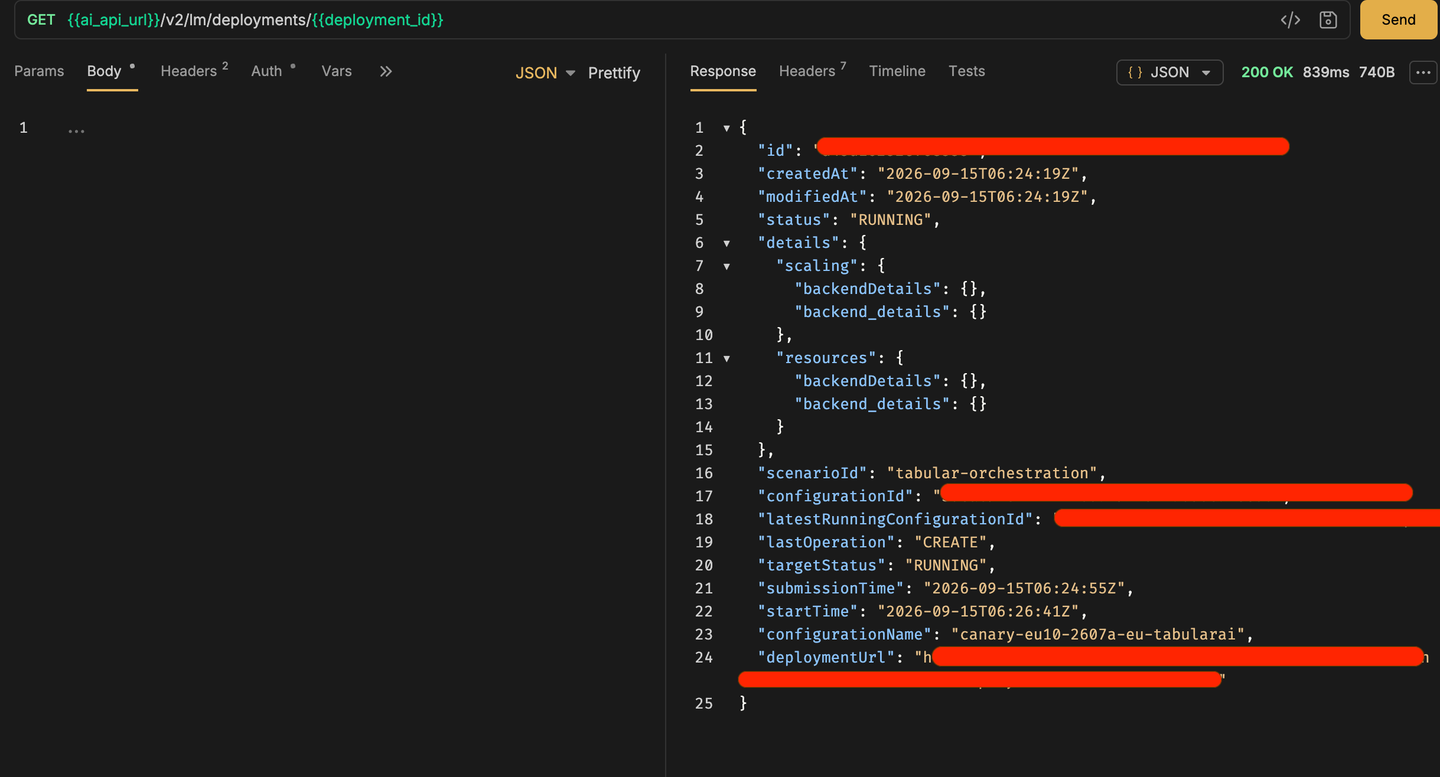
💡 The collection ships with a hardcoded configurationId and a leftover deployment_id from whoever exported it. Replace the configurationId with the one you created in step 3, and let step 4 overwrite deployment_id. Predictions against a deployment that is not yet RUNNING will fail.
The data destination tells the Context Registry where your dataset lives:
# ============================================================
# TCR REQUEST HELPER
# TCR is called separately from normal AI Core APIs.
# Do NOT reuse HEADERS here.
# ============================================================

TCR_HEADERS = {
    "Authorization": f"Bearer {TOKEN}",
    "Content-Type": "application/json",
    "AI-Resource-Group": RESOURCE_GROUP,
    "x-aicore-service-plan": "sap-internal"
}


def tcr_call(method, url, payload=None, expected=(200, 201, 202, 204, 409)):
    resp = requests.request(
        method,
        url,
        headers=TCR_HEADERS,
        json=payload,
        timeout=120,
    )

    try:
        body = resp.json()
    except ValueError:
        body = resp.text

    print(f"{method} {url}")
    print("Status:", resp.status_code)
    print("Response headers:", dict(resp.headers))

    if body:
        print("Response:")
        print(
            json.dumps(body, indent=2)
            if isinstance(body, (dict, list))
            else repr(body)
        )

    return resp.status_code, body

DEST_NAME = "canary-eu10-2607a-platform-test-dd"

dest_url = f"{TCR}/dataDestinations/{DEST_NAME}"

dest_body = {
    "type": "HDL",
    "adapterType": "File",
    "config": {
        "host": "28dxxxxxxxyyyyyyyyy8d5d8e8.files.hdl.canary-eu10.hanacloud.ondemand.com"
    }
}

status, body = tcr_call(
    "PUT",
    dest_url,
    dest_body
)

print("
PUT status:", status)

if status not in (200, 201, 202, 204, 409):
    raise RuntimeError(
        f"Data Destination registration failed with HTTP {status}"
    )
Run 2. Context Registry (Pre-step) → 1. Register Data Destination, then 1b. Get Data Destination status and wait until it reports a ready state.
URL:
PUT {{ai_api_url}}/v2/admin/tcr/dataDestinations/{{test_prefix}}-platform-test-ddHeaders:
Authorization: Bearer {{bearer_token}}
Content-Type: application/json
AI-Resource-Group: default
x-aicore-service-plan: sap-internal
Read the destination back to check its status:
GET {{ai_api_url}}/v2/admin/tcr/dataDestinations/{{test_prefix}}-platform-test-dd
💡 A RBAC: access denied here means your credentials or resource group lack Context Registry permissions — check the AI-Resource-Group and x-aicore-service-plan headers against a working request before assuming the URL is wrong.
If the resource group certificate is not yet registered in the HANA Data Lake Files instance, configure the subject patterns before registering the Tabular Artifact.
1. Go to the HANA Data Lake Files instance in SAP HANA Cloud Central and click Manage Configuration.

2. Click the Data Lake Files tab.

3. Go to Authorizations and create the required User Role Authorizations, ensuring that the subject patterns are filled in.

The artifact points at the specific file within the destination and declares its schema:
CSN_ELEMENTS = {
    "idx": {"type": "cds.Integer"},
    "Car Brand": {"type": "cds.String"},
    "Model": {"type": "cds.String"},
    "Price": {"type": "cds.Integer"},
    "Model Year": {"type": "cds.Integer"},
    "Location": {"type": "cds.String"},
    "Fuel": {"type": "cds.String"},
    "Driven (Kms)": {"type": "cds.Integer"},
    "Gear": {"type": "cds.String"},
    "Ownership": {"type": "cds.Integer"},
    "EMI (monthly)": {"type": "cds.Integer"}
}

artifact_body = {
    "dataDestinationName": DEST_NAME,
    "type": "CSV",
    "path": DATA_PATH,
    "csnMetadata": {
        "entityName": "CarEntity",
        "selectedColumns": list(CSN_ELEMENTS.keys()),
        "definition": {
            "definitionType": "DOCUMENT",
            "document": {
                "definitions": {
                    "CarEntity": {
                        "kind": "entity",
                        "elements": CSN_ELEMENTS
                    }
                }
            }
        }
    }
}

artifact_url = f"{TCR}/tabularArtifacts/{ARTIFACT_NAME}"

status, body = tcr_call(
    "PUT",
    artifact_url,
    artifact_body,
    expected=(200, 201, 202, 204, 409),
)

print("PUT status:", status)
show(body)

if status not in (200, 201, 202, 204, 409):
    raise RuntimeError("Tabular Artifact registration failed.")

status, verified = tcr_call("GET", artifact_url, expected=(200, 201, 202))
print("GET status:", status)
show(verified)

if status != 200:
    raise RuntimeError("Tabular Artifact could not be verified.")
Run 2. Register Tabular Artifact, then 2b. Get Tabular Artifact status until it reports registered.
URL:
PUT {{ai_api_url}}/v2/admin/tcr/tabularArtifacts/{{test_prefix}}-platform-test-taBody (JSON):
{
  "dataDestinationName": "{{test_prefix}}-platform-test-dd",
  "type": "CSV",
  "path": "/github-pipeline/used-cars-1m.csv",
  "csnMetadata": {
    "entityName": "CarEntity",
    "selectedColumns": [
      "idx",
      "Car Brand",
      "Model",
      "Price",
      "Model Year",
      "Location",
      "Fuel",
      "Driven (Kms)",
      "Gear",
      "Ownership",
      "EMI (monthly)"
    ],
    "definition": {
      "definitionType": "DOCUMENT",
      "document": {
        "definitions": {
          "CarEntity": {
            "kind": "entity",
            "elements": {
              "idx": { "type": "cds.Integer" },
              "Car Brand": { "type": "cds.String" },
              "Model": { "type": "cds.String" },
              "Price": { "type": "cds.Integer" },
              "Model Year": { "type": "cds.Integer" },
              "Location": { "type": "cds.String" },
              "Fuel": { "type": "cds.String" },
              "Driven (Kms)": { "type": "cds.Integer" },
              "Gear": { "type": "cds.String" },
              "Ownership": { "type": "cds.Integer" },
              "EMI (monthly)": { "type": "cds.Integer" }
            }
          }
        }
      }
    }
  }
}
Check the registration status:
GET {{ai_api_url}}/v2/admin/tcr/tabularArtifacts/{{test_prefix}}-platform-test-ta
Two errors are common at this step, and they mean different things:
{
  "error": {
    "code": "401",
    "message": "Access denied to file path '...' in HDL for tabular artifact '...'. The subject pattern for resource group (Subject DN: ...) may not be registered in HDL."
  }
}
Your resource group’s certificate is not authorized in the HDL instance. This cannot be fixed from the collection — send the full Subject DN from the error, your resource group name, the file path, and the requestId to whoever administers that HDL instance so they can register the subject pattern.
{
  "error": {
    "code": "400",
    "message": "File path '/used-cars/used-cars-1m.csv' does not exist in HDL for tabular artifact '...'"
  }
}
Access works, but the file is not at that path — correct path and re-register. If the artifact name already exists from the failed attempt, delete it first using the request in the Others folder.
The scenario configuration is the named object that prediction requests reference:
scm_body = {
    "tabularArtifacts": [
        {
            "name": ARTIFACT_NAME
        }
    ]
}

scenario_config_url = f"{TCR}/scenarioConfigurations/{SCENARIO_CONFIG_NAME}"

status, body = tcr_call(
    "PUT",
    scenario_config_url,
    scm_body,
    expected=(200, 201, 202, 204, 409),
)

print("PUT status:", status)
show(body)

if status not in (200, 201, 202, 204, 409):
    raise RuntimeError("Scenario Configuration registration failed.")
Run 3. Register Scenario Configurations, then 3b. Get Scenario Configuration status until it is ready.
URL:
PUT {{ai_api_url}}/v2/admin/tcr/scenarioConfigurations/{{test_prefix}}-platform-test-scmA successful create returns the object name:
{
  "name": "canary-eu10-2607a-platform-test-scm"
}
Check the status:

💡 This name must match the scenarioConfigName used by the prediction requests, which is built from {{test_prefix}}. If you change test_prefix between registration and prediction, the prediction will fail to find the configuration.
Send a small table with the cells to predict marked [PREDICT], and declare those columns in targetColumns:
PREDICT_URL = f"{BASE_URL}/v2/inference/deployments/{deployment_id}/predict"

QUERY_COLUMNS = {
    "Car Brand": ["Hyundai", "Maruti", "Tata"],
    "Model": ["EonERA", "Wagon R 1.0LXI", "Alto K10LXI"],
    "Price": ["330399", "350199", "229199"],
    "Model Year": ["2016", "2011", "2011"],
    "Location": ["[PREDICT]", "[PREDICT]", "[PREDICT]"],
    "Fuel": [
    "[PREDICT]",
    "Petrol",
    "Petrol"
]
}
PREDICT_HEADERS = {
    "Authorization": f"Bearer {TOKEN}",
    "AI-Resource-Group": RESOURCE_GROUP,
    "Content-Type": "application/json",

}
TARGET_COLUMNS = [{
    "name": "Location",
    "predictionPlaceholder": "[PREDICT]",
    "taskType": "classification"
}]

def build_payload(context_config=None, columns=None, target_columns=None):
    payload = {
        "modelName": MODEL_NAME,
        "scenarioConfigName": SCENARIO_CONFIG_NAME,
        "predictionConfig": {
            "targetColumns": target_columns or TARGET_COLUMNS
        },
        "columns": columns or QUERY_COLUMNS
    }
    if context_config is not None:
        payload["contextSelectionConfig"] = context_config
    return payload

result = requests.post(
    PREDICT_URL,
    headers=PREDICT_HEADERS,
    json=build_payload({"strategy": "random"}),
    timeout=120,
)

print("Status:", result.status_code)
print("Response:", result.text)

show(result)
def summarize(result, column=“Location”):
if hasattr(result, "json"):
    result = result.json()
if not isinstance(result, dict) or "predictions" not in result:
print("No predictions:", str(result)[:500])
return
meta = result.get("metadata", {})
print(
"context rows:", meta.get("num_rows"),
"| query rows:", meta.get("num_query_rows")
)
for i, row in enumerate(result["predictions"]):
for cand in row.get(column, []):
print(
f"row {i}: {cand.get(‘prediction’)} "
f"(confidence {cand.get(‘confidence’)})"
)
summarize(result)
Run 3. Tabular Orchestration → 1. Get predictions.
URL:
POST {{ai_api_url}}/v2/inference/deployments/{{deployment_id}}/predictBody (JSON):
{
  "modelName": "{{modelName}}",
  "scenarioConfigName": "{{test_prefix}}-platform-test-scm",
  "contextSelectionConfig": {
    "strategy": "random"
  },
  "predictionConfig": {
    "targetColumns": [
      {
        "name": "Location",
        "predictionPlaceholder": "[PREDICT]",
        "taskType": "classification"
      }
    ]
  },
  "columns": {
    "Car Brand":  ["Hyundai", "Maruti", "Tata"],
    "Model":      ["EonERA", "Wagon R 1.0LXI", "Alto K10LXI"],
    "Price":      ["330399", "350199", "229199"],
    "Model Year": ["2016", "2011", "2011"],
    "Location":   ["[PREDICT]", "[PREDICT]", "[PREDICT]"],
    "Fuel":       ["Petrol", "Petrol", "Petrol"]
  }
}
modelName comes from the folder-level variable — change it there (right-click the folder → Settings → Vars) to try a different tabular model, for example a smaller sap-rpt variant.
Only contextSelectionConfig changes between runs, so sweep it:
STRATEGIES = [
    ("random (default)", {"strategy": "random"}),
    ("random, 100 rows", {"strategy": "random", "numRows": 100}),
    ("random, 100000 rows", {"strategy": "random", "numRows": 100000}),
    ("heuristic", {"strategy": "heuristic", "indexColumn": "idx"}),
    ("auto", {"strategy": "auto"}),
]

runs = {}

for label, cfg in STRATEGIES:
    print(f"=== {label} ===")
    out = call(
        "POST",
        PREDICT_URL,
        build_payload(cfg),
        expected=(200, 201, 400, 500)
    )
    runs[label] = out
    summarize(out)
    print()
topk_targets = [{
    "name": "Location",
    "predictionPlaceholder": "[PREDICT]",
    "taskType": "classification",
    "topK": 3
}]

topk_result = call(
    "POST",
    PREDICT_URL,
    build_payload({"strategy": "random"}, target_columns=topk_targets),
    expected=(200, 201, 400, 500)
)

summarize(topk_result)
INLINE_COLUMNS = {
    "Car Brand": ["Hyundai", "Maruti", "Tata", "Hyundai", "Maruti"],
    "Model": ["EonERA", "Wagon R 1.0LXI", "Alto K10LXI", "EonERA", "Wagon R 1.0LXI"],
    "Price": ["330399", "350199", "229199", "330399", "350199"],
    "Model Year": ["2016", "2011", "2011", "2016", "2011"],
    "Location": ["[PREDICT]", "[PREDICT]", "[PREDICT]", "Hyderabad", "Hyderabad"],
    "Fuel": ["Petrol", "Petrol", "Petrol", "Petrol", "Petrol"]
}

inline = call(
    "POST",
    PREDICT_URL,
    build_payload({"strategy": "none"}, columns=INLINE_COLUMNS),
    expected=(200, 201, 400, 500)
)

runs["none, inline context"] = inline
summarize(inline)
rows = []

for label, out in runs.items():
    if not isinstance(out, dict) or "predictions" not in out:
        rows.append({"strategy": label, "context rows": None, "result": "failed"})
        continue

    meta = out.get("metadata", {})

    for i, pred in enumerate(out["predictions"]):
        top = (pred.get("Location") or [{}])[0]
        rows.append({
            "strategy": label,
            "context rows": meta.get("num_rows"),
            "query row": i,
            "prediction": top.get("prediction"),
            "confidence": top.get("confidence")
        })

comparison = pd.DataFrame(rows)
display(comparison)

if "prediction" in comparison.columns:
    summary = (
        comparison
        .groupby("strategy")
        .agg(
            context_rows=("context rows", "first"),
            distinct_predictions=("prediction", "nunique"),
            mean_confidence=("confidence", "mean")
        )
        .sort_values("mean_confidence", ascending=False)
    )
    display(summary)
random. If they do not, the retrieval is not adding value for this query set — which is itself a useful result.
The numbered requests in 3. Tabular Orchestration each set a different contextSelectionConfig. They all use the same URL — only the body changes:
POST {{ai_api_url}}/v2/inference/deployments/{{deployment_id}}/predict1. Random strategy, extra placeholder in an undeclared column
Fuel contains a [PREDICT] but is not listed in targetColumns, so it is returned untouched.
{
  "modelName": "{{modelName}}",
  "scenarioConfigName": "{{test_prefix}}-platform-test-scm",
  "contextSelectionConfig": {
    "strategy": "random"
  },
  "predictionConfig": {
    "targetColumns": [
      {
        "name": "Location",
        "predictionPlaceholder": "[PREDICT]",
        "taskType": "classification"
      }
    ]
  },
  "columns": {
    "Car Brand":  ["Hyundai", "Maruti", "Tata"],
    "Model":      ["EonERA", "Wagon R 1.0LXI", "Alto K10LXI"],
    "Price":      [330399, 350199, 229199],
    "Model Year": ["2016", "2011", "2011"],
    "Location":   ["[PREDICT]", "[PREDICT]", "[PREDICT]"],
    "Fuel":       ["[PREDICT]", "Petrol", "Petrol"]
  }
}
2. Random strategy with a small context (numRows: 100)
{
  "modelName": "{{modelName}}",
  "scenarioConfigName": "{{test_prefix}}-platform-test-scm",
  "contextSelectionConfig": {
    "strategy": "random",
    "numRows": 100
  },
  "predictionConfig": {
    "targetColumns": [
      {
        "name": "Location",
        "predictionPlaceholder": "[PREDICT]",
        "taskType": "classification"
      }
    ]
  },
  "columns": {
    "Car Brand":  ["Hyundai", "Maruti", "Tata"],
    "Model":      ["EonERA", "Wagon R 1.0LXI", "Alto K10LXI"],
    "Price":      ["330399", "350199", "229199"],
    "Model Year": ["2016", "2011", "2011"],
    "Location":   ["[PREDICT]", "[PREDICT]", "[PREDICT]"],
    "Fuel":       ["Petrol", "Petrol", "Petrol"]
  }
}
3. Random strategy with a row count above the model limit (numRows: 100000)
{
  "modelName": "{{modelName}}",
  "scenarioConfigName": "{{test_prefix}}-platform-test-scm",
  "contextSelectionConfig": {
    "strategy": "random",
    "numRows": 100000
  },
  "predictionConfig": {
    "targetColumns": [
      {
        "name": "Location",
        "predictionPlaceholder": "[PREDICT]",
        "taskType": "classification"
      }
    ]
  },
  "columns": {
    "Car Brand":  ["Hyundai", "Maruti", "Tata"],
    "Model":      ["EonERA", "Wagon R 1.0LXI", "Alto K10LXI"],
    "Price":      ["330399", "350199", "229199"],
    "Model Year": ["2016", "2011", "2011"],
    "Location":   ["[PREDICT]", "[PREDICT]", "[PREDICT]"],
    "Fuel":       ["Petrol", "Petrol", "Petrol"]
  }
}
4. Top-K candidate values per cell (topK: 3)
topK is a prediction option, not a context strategy — it returns the three most likely values for each cell instead of one.
{
  "modelName": "{{modelName}}",
  "scenarioConfigName": "{{test_prefix}}-platform-test-scm",
  "predictionConfig": {
    "targetColumns": [
      {
        "name": "Location",
        "predictionPlaceholder": "[PREDICT]",
        "taskType": "classification",
        "topK": 3
      }
    ]
  },
  "columns": {
    "Car Brand":  ["Hyundai", "Maruti", "Tata"],
    "Model":      ["EonERA", "Wagon R 1.0LXI", "Alto K10LXI"],
    "Price":      ["330399", "350199", "229199"],
    "Model Year": ["2016", "2011", "2011"],
    "Location":   ["[PREDICT]", "[PREDICT]", "[PREDICT]"],
    "Fuel":       ["Petrol", "Petrol", "Petrol"]
  }
}
5. Random strategy, all context columns known
{
  "modelName": "{{modelName}}",
  "scenarioConfigName": "{{test_prefix}}-platform-test-scm",
  "contextSelectionConfig": {
    "strategy": "random"
  },
  "predictionConfig": {
    "targetColumns": [
      {
        "name": "Location",
        "predictionPlaceholder": "[PREDICT]",
        "taskType": "classification"
      }
    ]
  },
  "columns": {
    "Car Brand":  ["Hyundai", "Maruti", "Tata"],
    "Model":      ["EonERA", "Wagon R 1.0LXI", "Alto K10LXI"],
    "Price":      ["330399", "350199", "229199"],
    "Model Year": ["2016", "2011", "2011"],
    "Location":   ["[PREDICT]", "[PREDICT]", "[PREDICT]"],
    "Fuel":       ["Petrol", "Petrol", "Petrol"]
  }
}
6. Heuristic strategy (requires indexColumn)
{
  "modelName": "{{modelName}}",
  "scenarioConfigName": "{{test_prefix}}-platform-test-scm",
  "contextSelectionConfig": {
    "strategy": "heuristic",
    "indexColumn": "idx"
  },
  "predictionConfig": {
    "targetColumns": [
      {
        "name": "Location",
        "predictionPlaceholder": "[PREDICT]",
        "taskType": "classification"
      }
    ]
  },
  "columns": {
    "Car Brand":  ["Hyundai", "Maruti", "Tata"],
    "Model":      ["EonERA", "Wagon R 1.0LXI", "Alto K10LXI"],
    "Price":      ["330399", "350199", "229199"],
    "Model Year": ["2016", "2011", "2011"],
    "Location":   ["[PREDICT]", "[PREDICT]", "[PREDICT]"],
    "Fuel":       ["Petrol", "Petrol", "Petrol"]
  }
}
⚠️ indexColumn belongs inside contextSelectionConfig. Omitting it returns Value error, 'indexColumn' is required when strategy is 'heuristic', and placing it under predictionConfig returns Extra inputs are not permitted.
7. Auto strategy
{
  "modelName": "{{modelName}}",
  "scenarioConfigName": "{{test_prefix}}-platform-test-scm",
  "contextSelectionConfig": {
    "strategy": "auto"
  },
  "predictionConfig": {
    "targetColumns": [
      {
        "name": "Location",
        "predictionPlaceholder": "[PREDICT]",
        "taskType": "classification"
      }
    ]
  },
  "columns": {
    "Car Brand":  ["Hyundai", "Maruti", "Tata"],
    "Model":      ["EonERA", "Wagon R 1.0LXI", "Alto K10LXI"],
    "Price":      ["330399", "350199", "229199"],
    "Model Year": ["2016", "2011", "2011"],
    "Location":   ["[PREDICT]", "[PREDICT]", "[PREDICT]"],
    "Fuel":       ["Petrol", "Petrol", "Petrol"]
  }
}
8. No retrieval, with context rows supplied inline
The last two rows have a known Location and act as the context; the first three are the query rows.
{
  "modelName": "{{modelName}}",
  "scenarioConfigName": "{{test_prefix}}-platform-test-scm",
  "contextSelectionConfig": {
    "strategy": "none"
  },
  "predictionConfig": {
    "targetColumns": [
      {
        "name": "Location",
        "predictionPlaceholder": "[PREDICT]",
        "taskType": "classification"
      }
    ]
  },
  "columns": {
    "Car Brand":  ["Hyundai", "Maruti", "Tata", "Hyundai", "Maruti"],
    "Model":      ["EonERA", "Wagon R 1.0LXI", "Alto K10LXI", "EonERA", "Wagon R 1.0LXI"],
    "Price":      ["330399", "350199", "229199", "330399", "350199"],
    "Model Year": ["2016", "2011", "2011", "2016", "2011"],
    "Location":   ["[PREDICT]", "[PREDICT]", "[PREDICT]", "Hyderabad", "Hyderabad"],
    "Fuel":       ["Petrol", "Petrol", "Petrol", "Petrol", "Petrol"]
  }
}
9. No retrieval, without context rows — expected to fail
{
  "modelName": "{{modelName}}",
  "scenarioConfigName": "{{test_prefix}}-platform-test-scm",
  "contextSelectionConfig": {
    "strategy": "none"
  },
  "predictionConfig": {
    "targetColumns": [
      {
        "name": "Location",
        "predictionPlaceholder": "[PREDICT]",
        "taskType": "classification"
      }
    ]
  },
  "columns": {
    "Car Brand":  ["Hyundai", "Maruti", "Tata"],
    "Model":      ["EonERA", "Wagon R 1.0LXI", "Alto K10LXI"],
    "Price":      ["330399", "350199", "229199"],
    "Model Year": ["2016", "2011", "2011"],
    "Location":   ["[PREDICT]", "[PREDICT]", "[PREDICT]"],
    "Fuel":       ["Petrol", "Petrol", "Petrol"]
  }
}
⚠️ strategy: "none" disables retrieval, but the tabular model still requires at least two context rows. Without them the request fails with Not enough context rows provided. Minimum is 2. — this is expected behaviour, not a defect.
In this tutorial, you ran the complete Tabular AI flow in SAP AI Core and compared its context selection strategies:
- Deployed the
tabular-orchestrationscenario — created a configuration, created a virtual deployment from it, and waited forRUNNINGbefore attempting any prediction. - Registered a data destination in the Context Registry pointing at SAP HANA Data Lake Files, and read it back to confirm registration.
- Registered a tabular artifact with its CSN metadata for the used-cars CSV, learning to distinguish the two failure modes at this step — a
401subject-pattern error (certificate not authorized in HDL, needs an administrator) from a400path error (authorized, wrong path). - Registered a scenario configuration binding the artifact to a name that prediction requests reference.
- Ran predictions with
[PREDICT]placeholders, and learned that only columns declared intargetColumnsare filled — a placeholder elsewhere is silently ignored. - Read the response structure — per-prediction confidence, and
metadata.num_rowsshowing how many context rows were actually retrieved from the registered dataset. - Swept the context selection strategies —
random(default, small and oversizednumRows),heuristic,autoandnone— plustopKfor multiple candidate values per cell, including the two schema requirements that are easy to get wrong:indexColumnbelongs insidecontextSelectionConfigand is mandatory forheuristic, andnonerequires at least two context rows supplied inline. - Compared results across strategies — using differentiation between predictions and confidence scores, rather than any single call, to judge whether retrieval is improving prediction quality.
Resources
Discussion
Share feedback on this tutorial or join the conversation in SAP Community.