
Overview
You will learn
- How to configure REST Delivery Points in SAP Integration Suite, advanced event mesh.
- How to forward messages from a queue to a REST consumer.


Prerequisites
- You have access to an SAP Integration Suite, advanced event mesh tenant and an SAP Integration Suite tenant.
Steps
Intro
Now that you are familiar with the SAP Integration Suite, advanced event mesh, how you can publish and subscribe to events, and how you can exchange messages using an event broker service, you will tackle a common business scenario: forwarding events to an application that exposes a REST endpoint. In this particular case, you will forward events to SAP Build Process Automation, so that you can trigger a business process in it. For example, you may want to forward the BusinessPartner created event from SAP S/4HANA Cloud.
There are scenarios where the target system/application can’t consume messages directly from an event broker but you still want these systems/applications to be part of our event-driven world and react to events as they are produced. Fortunately, some of these systems might expose APIs (REST endpoints) through which you can notify them of an event.
For these cases, you can leverage REST Delivery Points to forward messages from a queue to that system. For example, the integration you are about to configure between SAP S/4HANA Cloud and SAP Build Process Automation goes through an event broker service in SAP Integration Suite, advanced event mesh. In AEM, you end up configuring a REST Delivery Point to forward the events received and start a process in SAP Build Process Automation.
You can check out this SAP Tech Bytes: SAP S/4HANA Cloud + SAP Integration Suite, AEM + SAP Build Process Automation.
By the end of this tutorial, you will achieve a communication scenario like the one below.

SAP Integration Suite, advanced event mesh will be forwarding events to SAP Build Process Automation. In order to configure the secure connection between these services, you will need to create a service key for SAP Build Process Automation, which will be used by AEM to connect and deliver the event to SAP Build Process Automation service.
In the SAP BTP cockpit, go to Instances and Subscriptions.
Under Instances, choose the 3 dots next to the SAP Build Process Automation instance, for example, spa-service in the screenshot below, and select

Create Service Key In the dialog, give the key a name, for example, spa-key.

Key name Choose Create
After the key is created (it will take about half a minute), choose the 3 dots next to the key and download the key.

Key name Keep it in a safe place. You will need it later in the tutorial.
A REST delivery point (RDP) is a provisioned object on an event broker service that facilitates message delivery to REST consumers. The RDP can be bound to message queues to deliver messages from those queues to REST consumers. The RDP maintains a list of REST consumers, which are identified by their remote connection information.
For this tutorial, you will use an event broker service in AEM and in it, you can create a new queue or reuse an existing queue. In the steps below you will be using a queue named EDP_BP_Created_[SAPCommunityDisplayName] but this can be something different on your end.
To learn how to configure a queue in SAP Integration Suite, advanced event mesh, you can check out this tutorial 👉 Queues and subscriptions in SAP Integration Suite, advanced event mesh
The queue will need to be subscribed to the business event that you are interested in sending to SAP Build Process Automation, for example the default/sap.s4/S4D/ce/ce/sap/s4/beh/businesspartner/v1/BusinessPartner/Created/v1 topic which is where an Business Partner created event will be published.
Note that in order for SAP Build Process Automation to be able to process the event, the event needs to follow the CloudEvents specification.
Now that you know what a REST Delivery Point is, you are ready to create a REST Delivery Point (RDP) to forward messages from the queue to a REST consumer.
Inside the event broker service where the queue exists, choose Open Broker Manager.
Choose Clients on the left-side menu.
Choose REST.

REST client Choose + REST Delivery Point.

New REST client Enter a name, for example,
EDP-SBPA-BPCreated-[SAPCommunityDisplayName].
RDP Creation Choose Create.
A simple configuration form will appear. No need to modify anything here – Do not enable the RDP yet, that is, leave the toggle button off.
Choose Apply.

RDP Creation Once created, go to the RDP details page by clicking on the name of the RDP.

RDP Creation You will see that there isn’t much here yet, as you haven’t configured the REST consumer details. You will do this now.
RDP details
Now that you’ve created a REST Delivery Point, you have to specify where you want events sent.
Navigate to the REST Consumers tab.
Choose the + REST Consumer button, and enter the name, for example,
SBPA_[SAPCommunityDisplayName].Choose Create.

Create REST consumer A configuration form will be displayed.
Enter the details from the SAP Build Process Automation service key created in the previous step.
IMPORTANT: Do not enable the REST Consumer yet – leave the toggle button off.
Enter the following:
Field Value Host Value from service key .endpoints.api, for examplespa-api-gateway-bpi-us-prod.cfapps.[region].hana.ondemand.comPort 443HTTP Method POSTTLS Enabled YesAuthentication Scheme OAuth 2.0 Client CredentialsClient ID Value from service key .uaa.clientid, for example sb-VQ18I1VS-3226-5LF1-JVWV-760D08FHP857-3ok534d4-8562-632j-436w-0j5b0n8r4d0l!b139588 | eventing-xsuaa-broker!b####Client Secret Value from service key .uaa.clientsecretToken Endpoint URL Concatenate the value from service key .uaa.url, for example https://[host].authentication.[region].hana.ondemand.com, and/oauth/tokenToken Expiry Default 3600Choose Apply.

SBPA REST consumer
The newly created REST consumer will be listed in the REST Consumers tab. Now you need to configure the queue that you will bind to our RDP. Events in this queue will be forwarded.
Now that you have a REST consumer configured, you can proceed to bind a queue and configure the binding for our REST Delivery Point. All events received by the queue will be then forwarded to the REST consumer you configured, once enabled.
Navigate to the Queue Bindings tab.
Choose the + Queue Binding button.
Select the queue you previously created, for example,
EDP_BP_Created_[SAPCommunityDisplayName].
Queue binding set up Choose Create.
A simple configuration form will be displayed.
In the Post Request Target field, you need to enter the path where you can send events to SAP Build Process Automation (
/internal/be/v1/events). Notice that you will need to include the/at the beginning of the value.Enter the following details:
Field Value Post Request Target /internal/be/v1/eventsRequest Target Evaluation None Replace Target Authority No Choose Apply.

Post request target
The newly created queue binding will be listed in the Queue Bindings tab. Now you need to configure a request header that is required by SAP Build Process Automation.
Now that you have a Queue binding configured, you need to set some request headers which are specific to SAP Build Process Automation.
In the Queue Bindings tab, select your queue binding.

Open queue binding Navigate to the Request Headers tab.

Go to Request Headers You will create 2 headers.
For each, you will choose + Request Header, enter the header name, then the header value, and then choose Apply.
Create the following headers:
Header Name Header Value Content-Typeapplication/cloudevents+jsonWebHook-Request-Originaem
Queue binding - Request headers
In the request headers configured you specified the Content-Type header. You can see that its value is application/cloudevents+json. This is because SAP Build Process Automation expects events that follow the CloudEvents specification.
Now that you’ve created the request headers, you are ready to enable the REST consumer and the RDP.
You’ve configured the REST consumer and the queue binding, you can enable the REST consumer and the RDP.
First, let’s see all the objects that you’ve configured.
Navigate back to the main page for your RDP.
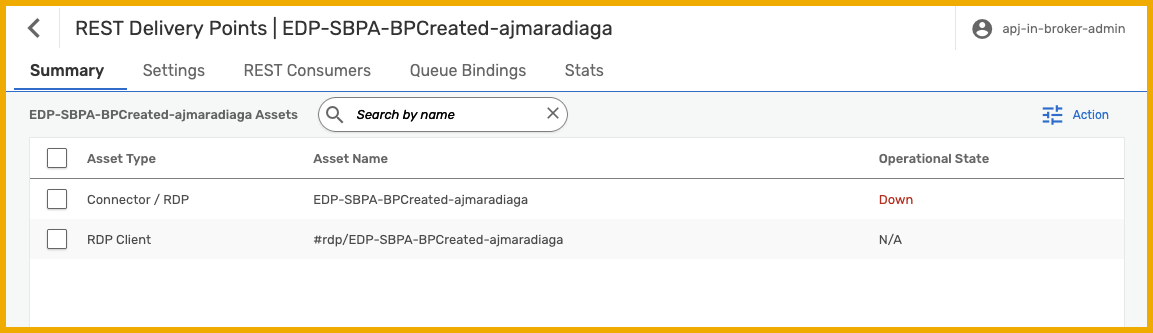
Select the Summary tab. Here you will see all the objects and their status. Notice that the only object in an operational state is the queue you created at the beginning of the exercise.

RDP object Navigate to the REST Consumers tab, and choose the name of your REST consumer, for example,
SBPA_[SAPCommunityDisplayName].
Select REST consumer Choose the Edit button on the top right.

Select REST consumer Enable the REST consumer by toggling the Enabled setting.
Choose Apply.
Now you are ready to enable our RDP.
Navigate back to the main page for your RDP.
Select the Summary tab.
Choose the Connector / RDP, for example,
EDP-SBPA-BPCreated-[SAPCommunityDisplayName].Choose Edit on the top right, and enable the RDP by toggling the Enabled setting.
Choose the Apply button.
Once you enable the RDP, if you navigate to the
Summarytab, you should see that all the objects are in an operational state.
RDP objects - All operational Now, go to the SAP S/4HANA Cloud system and create a Business Partner.
This will trigger a Business Partner event which you will receive in your queue.
Check that the queue configured for the RDP is accumulating messages.

Received messages in queue
Now that you’ve created events and sent them to your SAP Build Process Automation tenant, create a project that can be triggered by those events.
To achieve this, you can follow the steps in the Capture Events in SAP Build Process Automation tutorial.
This tutorial completed all the configuration required for the REST Delivery Point.
- Created a REST Delivery Point.
- Defined an RDP REST Consumer, where you configured the details of our SAP Build Process Automation tenant.
- Bound a queue to our RDP.
- Added request headers to the queue binding.
- Enabled it all.
In this tutorial, you have learned how to create a REST Delivery Point (RDP) to forward messages from a queue to a REST consumer. You used OAuth 2.0 authentication to securely deliver events to SAP Build Process Automation. Now you know a mechanism to enable systems that expose REST endpoints to “react” to events produced by an event broker service.
- Managing REST Delivery Points - link.
- REST Consumer Authentication Schemes - link.
- Integration with Advanced Mesh Service Plan for Service Cloud - link.
Things to Ponder
- What if you would need to transform or enrich the message before sending it to the REST consumer? How would you do it?
- Can you think of a system within your company that exposes REST endpoints and could benefit from being part of an event-driven architecture?
Resources
Discussion
Share feedback on this tutorial or join the conversation in SAP Community.