Create and implement the workflow handler class to trigger the workflow and handle callbacks from SAP Build Process Automation to receive workflow completion notifications and outcome.
Make sure, your system has the ABAP flight reference scenario by searching for package **/DMO/FLIGHT. If your system does not have this scenario. You can download it [here] ([https://eclipse.abapgit.org/updatesite/]).
Once you have created a basic RAP Travel Application by following steps in tutorial Generate a RAP Business Service with the wizard. You would now create a new class in the application package to handle workflow related implementations i.e., method to create workflow trigger and method to handle callbacks to receive outcome of workflow from SAP Build Process Automation once the process is completed.
In case of Travel Approval Workflow, the callback applies the accept / reject decision of the workflow to the Accept Travel /Reject Travel statuses of the related travel instance.
Step 1Create a workflow handler class
—
The workflow handler class will contain all the method implementations, constants, interface data types to exchange information with SAP Build Process Automation for workflow.
To create the class, follow the below steps:
Right click on your Package and select New > ABAP Class
ABAPClass
Enter the below values to create the class.
Name: ZCL_R_RAP_WORKFLOW_####
Description: Workflow Handler Class
Click Add to enter Interface and search for callback Interface IF_SWF_CPWF_CALLBACK.
Click OK once found.
Interface
Click Next. Select the transport request for your application and click Finish.
Class is now created. You can see that the interface addition came with the method workflow_instance_completed which would be triggered during callback post completion of workflow in SAP Build Process Automation.
In the later steps we would implement this method to receive workflow decision/notification.
CallbackClass
Thus to enable a class to be callback class we need to add Interface IF_SWF_CPWF_CALLBACK to it.
IF_SWF_CPWF_CALLBACK is the interface required to handle callbacks. The method WORKFLOW_INSTANCE_COMPLETED of this interface is triggered in background once the Action Workflow Completion Notification is triggered in SAP Build Process Automation Post Approval Form is acted upon by the Approver (Accepted/Rejected).
To troubleshoot/debug this method you would use the Background workflow user SAP_WFRT.
Step 2### Enrich the class definition with Constants and Data Types and Methods
+
Define the class artifacts required for workflow processing.
Define Context (Interface) Data type in the private section of the class. Insert the below code.
This should be same as the data type context structure declare in SAP Build Process Automation.
Since the Datatype identifier name created in SAP Build Process Automation is `TravelContext` thus we have also declared the structure name as `travel_context`. How the name conversion works when we convert from ABAP data to JSON format will be explained in detail as we go through the tutorial.
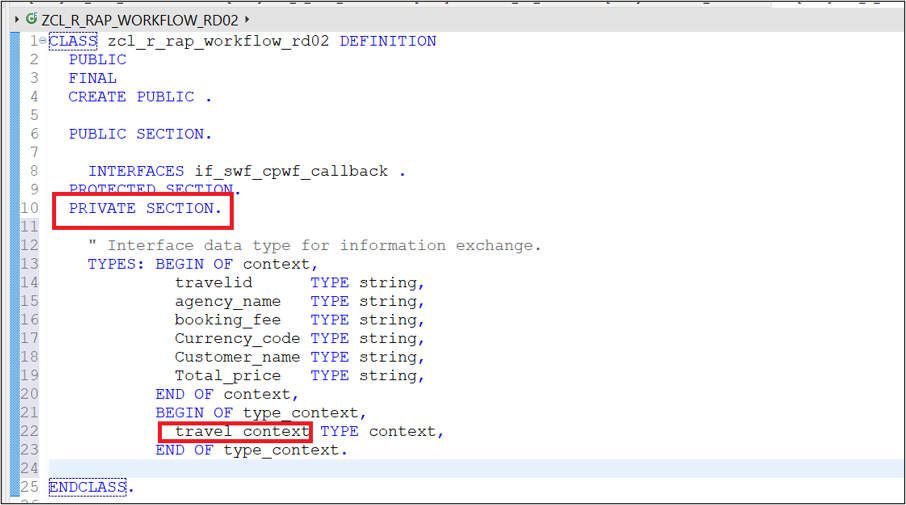
>Please note, Context (Interface Data) must have the same field data types and names on both sides of the Interface. Context is case sensitive, so any deviation would lead to error.
`HTTP request for use case START_WI failed (HTTP code 422, Reason 'Unprocessable Entity')`
Get the workflow definition ID from SAP Build Process Automation.
a. Login to SAP Build Process Automation.
b. Navigate to Monitoring > Processes and Workflows
workflows
c. Choose your project name from the drop down > Select the project name.
Copy the entire text in ID highlighted below, that is your Workflow Definition ID.
WorkflowDefinition
Define Constants in the private section of the class. Insert the below code.
ABAP
Constantsforworkflow,CONSTANTS:BEGIN OFtravel_status,openTYPE cLENGTH1VALUE'O',"Open,
acceptedTYPE cLENGTH1VALUE'A',"Accepted,
rejectedTYPE cLENGTH1VALUE'X',"Rejected,
waitingTYPE cLENGTH1VALUE'W',"Awaiting Approval,
END OFtravel_status,travel_wf_defidTYPE if_swf_cpwf_api=>cpwf_def_id_longVALUE'euXX-XXXX.XXXX-XXXXX-XXXX-XXXXXXX- XXXX.rap110travelworkflow.travelApprovalProcessing'," Replace this value with your workflow definition id.
wf_retention_daysTYPE if_swf_cpwf_api=>retention_timeVALUE'30',callback_classTYPE if_swf_cpwf_api=>callback_classnameVALUE'ZCL_R_RAP_WORKFLOW_XXXX'," Replace this with your callback class
consumerTYPE stringVALUE'DEFAULT'.
Do not forget to replace the values for workflow definition ID & Callback class values for your implementation.
Constant Name
Use
Values
Travel_status
To store the allowed value of the overall status of a Travel instance
Possible values can be Open (O), Approved (A), rejected (R) and Awaiting Approval (W).
wf_retention_days
Retention time is the time we keep the database entry post completion of Workflow instance. After the retention days are passed the database entry will be deleted automatically.
In case the retention time is set to 0 the entry would not be deleted automatically but would require an API call for deletion
Set the retention days to 30
callback_class
Class we created with callback interface to be used while Registering the SAP Build Process Automation Workflow using RAP Facade
Set the Value to ZCL_R_RAP_WORKFLOW_XXXX
Consumer
Tells the information on where to trigger the workflow.
Set the Value to DEFAULT
In the Communication Arrangement for SAP Build Process Automation we have set the consumer type (Workflow) as default
As we need to execute the workflow in SBPA
travel_wf_defid
Is the Definition ID of the workflow we created in SBPA
Set the value to the Workflow definition ID retrieved from SAP Build Process Automation.
RAPWorkflow
Define Method to trigger workflow in public section.
The method interface will consist of all the travel_context fields declared in the datatype.
It is declared in the public section of the class so that it can be called from the behaviour definition class of the RAP Business Object.
RAPBusinessObject
Click on Quick Assist available on the left side of the newly defined method > Click Add implementation for trigger workflow
TriggerWorkflow
This will create the method in the implementation section of the class as shown below.
ImplementationClass
Activatealt textthe class.
Step 3Implement methods to trigger workflow in the Class Implementation Section.
+
Implement the method trigger_workflow to call the RAP façade I_CPWF_INST using EML (Entity Manipulation language).
With the released Business Object Interface, I_CPWF_INST you can trigger workflow out of your BTP ABAP environment like in this case in SAP Build Process automation
The Entity Manipulation Language (EML) is an extension of the ABAP language which offers an API-based access to RAP business objects. EML is used to implement the transactional behavior of RAP business objects and, also to access existing RAP business objects from outside the RAP context.
Insert the following code snippet in the method. You can use the F1 help to get detailed information on each EML statement.
ABAP
METHODtrigger_workflow.*registertheworkflowTRY.MODIFYENTITIESOFi_cpwf_instENTITYCPWFInstance"Changed#RD
EXECUTEregisterWorkflowFROMVALUE#((%key-CpWfHandle=''"cl_system_uuid=>create_uuid_x16_static( )
%param-RetentionTime=wf_retention_days%param-PaWfDefId=travel_wf_defid%param-CallbackClass=callback_class%param-Consumer=consumer))MAPPEDDATA(mapped_wf)FAILEDDATA(failed_wf)REPORTEDDATA(reported_wf).IFmapped_wfIS NOT INITIAL."Map the fields to the outgoing context.
DATA(context)=VALUEtype_context(travel_context-travelid=travelidtravel_context-agency_name=agency_nametravel_context-booking_fee=booking_feetravel_context-Currency_code=currency_codetravel_context-Customer_name=customer_nametravel_context-Total_price=total_price).CONDENSE:context-travel_context-Total_price,context-travel_context-travelid." Set the workflow context for the new workflow instances
TRY.DATA(lo_cpwf_api)=cl_swf_cpwf_api_factory_a4c=>get_api_instance().DATA(json_conv)=lo_cpwf_api->get_json_converter().DATA(context_json)=json_conv->serialize(data=context).CATCHcx_swf_cpwf_api.ENDTRY.*passthePayloadtoworkflowMODIFYENTITIESOFi_cpwf_instENTITYCPWFInstanceEXECUTEsetPayloadFROMVALUE#((%key-CpWfHandle=mapped_wf-cpwfinstance[1]-CpWfHandle%param-context=context_json))MAPPEDmapped_wfFAILEDfailed_wfREPORTEDreported_wf##NO_LOCAL_MODE.ENDIF.CATCHcx_uuid_error."handle exception
ENDTRY.ENDMETHOD
Your method would look like this.
MethodtriggerCode
Short explanation of the flow logic:
First step is to Register the workflow. This is done by using the EML Operation MODIFY ENTITIES on RAP Business Object Interface (RAP Façade) I_CPWF_INST, Entity CPWFInstance to execute Register Workflow action of the BO interface I_CPWF_INST with the below input parameters.
%key-CpWfHandle: UUID to uniquely identify each travel instance. Can be generated by using method cl_system_uuid=>create_uuid_c32_static ().
In this case we are leaving it blank as we are processing only one travel instance at a time thus the unique id would be generated by the BO Interface I_CPWF_INST.
Other fields defined as Class Constants.
%param-RetentionTime = wf_retention_days
%param-PaWfDefId = travel_wf_defid
%param-CallbackClass = callback_class
%param-Consumer = consumer
In case of bulk trigger of workflow for example if you have more than 1 travel instance to trigger workflow, the key CpWfHandle of interface I_CPWF_INST needs to be specified externally. A UUID with 32 characters is expected as input parameter. If the action registerWorkflow is called repeatedly with the same CpWfHandle and an identical payload, this results in a short dump. It is recommended to use the method cl_system_uuid >create_uuid_c32_static( ) to create the required UUIDs.
Second step is to map the internal data and convert it to JSON format.
cl_swf_cpwf_api_factory_a4c is used as a helper class to get access to the JSON converter.
Method SERIALIZE used for JSON Conversion. It will by default do the mapping as under.
Removes _ from the field names.
First letter in Field name would be converted to capital letter.
In case of _ the first letter of each word separated by _ will be converted to capital.
Please see field conversion below for your application.
SBPA Field Name
ABAP Field Name
Travel ID
travel_id
Agency Name
agency_name
Booking Fee
booking_fee
Currency Code
currency_code
Customer Name
customer_name
Total Price
total_price
In case you want to follow other format please investigate other options available in the method GET_JSON_CONVERTER.
jsonconverter
At last, you would call SetPayload action of the BO interface I_CPWF_INST Entity CPWFInstance using EML Operation MODIFY ENTITIES. This would provide the input data for the workflow instance in JSON format using input parameters Workflow Handler ID and Context data in JSON format.
Activatealt textthe class.
Step 4Implement methods to handle callback in the Class Implementation Section.
+
Implement the method if_swf_cpwf_callback~workflow_instance_completed to handle callback from SAP Build Process automation on workflow process completion.
Insert the following code snippet in the method and replace all occurrences of the placeholder #### with your group ID. You can use the F1 help to get detailed information.
 on each EML statement
ABAP
METHODif_swf_cpwf_callback~workflow_instance_completed.TYPES:BEGIN OFcallback_context,start_eventTYPE type_context,END OFcallback_context.DATA:callback_contextTYPE callback_context.DATA:travelidTYPE/dmo/travel_id.TRY.* Get the API of workflow.DATA(cpwf_api)=cl_swf_cpwf_api_factory_a4c=>get_api_instance().* Get the Context of workflow using workflow handler ID in jason format* Convert it into internal data format callback_context.DATA(context_xstring)=cpwf_api->get_workflow_context(iv_cpwf_handle=iv_cpwf_handle).DATA(outcome)=cpwf_api->get_workflow_outcome(iv_cpwf_handle=iv_cpwf_handle).cpwf_api->get_context_data_from_json(EXPORTINGiv_context=context_xstringit_name_mapping=VALUE#((abap='start_event'json='startEvent'))IMPORTINGev_data=callback_context).CATCHcx_swf_cpwf_apiINTODATA(exception).ENDTRY.IFoutcomeIS INITIAL.DATA(status)='X'.ELSE.status='A'.ENDIF.* Since Travel ID is not key we would not be able to use EML to update status using it.* Ideally Travel ID in real time scenario would be a unique key* derived by Late or early numbering and you would be able to use EML to udate status.* For this scenario we would have to get the travel UUID as that's the key.travelid=callback_context-start_event-travel_context-travelid." Replace the suffix (last 4 digits) with your choosen group id.
SELECTSINGLEtraveluuidFROMzr_rap_travel_rd02WHEREtravelid=@travelidINTO@DATA(traveluuid).IFsy-subrc=0." Update the status of the travel based on the workflow outcome.
MODIFYENTITIESOFzr_rap_travel_rd02" Replace the suffix with your choosen group id.
ENTITYtravelUPDATEFIELDS(OverallStatus)WITHVALUE#((traveluuid=traveluuidOverallStatus=status))FAILEDDATA(ls_failed)REPORTEDDATA(ls_reported).COMMITENTITIES.ENDIF.ENDMETHOD.
Your method would look like this
CodeSnippet1
CodeSnippet2
Short explanation of the flow logic
Class cl_swf_cpwf_api_factory_a4c is used as a helper class to get access to the Workflow APIs.
With the Workflow API Instancecpwf_api you would call method get_workflow_context using Workflow Handler Id sent by SAP Build Process Automation during callback to get the Context data in xstring format.
Method call get_workflow_outcome is used to get the outcome of Workflow sent by SBPA.
Next there is further method call to format the Context data received and deserialize it into internal data format.
EML Operations can be triggered with key values only, get the key for Business Object using root CDS View zr_rap_travel_####.
Once we have the data, call the EML Operation MODIFY ENTITIES for Travel Business Object zr_rap_travel_XXXX, entity travel to update the overall status of the travel instance as per the outcome of workflow sent by SAP Build Process Automation.
Activatealt textthe class.
Your Implementation for the Workflow Class is now complete. In the further tutorial you will see how we can call the workflow trigger method from the RAP Business Object.
Share feedback on this tutorial or join the conversation in SAP Community.
Submit detailed feedbackDiscuss in Community
Steps
Step 1 of 5
1. Create a workflow handler class2. ### Enrich the class definition with Constants and Data Types and Methods3. Implement methods to trigger workflow in the Class Implementation Section.4. Implement methods to handle callback in the Class Implementation Section.5. Test yourself
Joule
AI Notice
Joule is an AI assistant. Generative AI may produce inaccurate, incomplete, or biased information. Always verify important details before acting on them.
Conversations are sent to SAP-hosted large language models for processing. Do not include personal data, credentials, or confidential information in your messages.
Joule's responses are based on the SAP tutorial catalog and may not reflect the latest product changes. For authoritative guidance, consult the linked tutorials and official SAP documentation.


